
Let me be honest with you.
When I first started using ChatGPT for digital marketing, I thought it was just a fancy autocomplete tool. I typed in “write a blog about digital marketing,” got back something generic and forgettable, and almost gave up on it entirely.
That was my mistake — and it’s the same mistake most beginners make.
Here’s what nobody tells you upfront: ChatGPT is only as good as the instructions you give it. A lazy prompt gives you lazy output. But when you learn to write specific, context-rich prompts? The whole thing changes.
Suddenly you have a tool that helps you plan content calendars, write email sequences, brainstorm ad angles, research SEO keywords, and create social media posts — all in a fraction of the time it used to take.
That’s what this guide is about. Not the hype. Not the theory. Just practical, tested ways to use ChatGPT for digital marketing in 2026 — with real prompts you can copy and use today.
Whether you’re a complete beginner or someone who’s dabbled with AI tools before, there’s something useful here for you. Let’s get into it.
What is ChatGPT?
ChatGPT is an AI-powered chatbot developed by OpenAI. It can read text, understand context, and generate human-like responses across almost any topic you throw at it.
For digital marketers, think of it less like a robot and more like a very fast, very well-read assistant who never gets tired. It can write, brainstorm, summarize, outline, rewrite, and research — all on demand.
The important thing to understand is this: ChatGPT doesn’t think for you. It helps you think faster. The strategy, the brand voice, the audience understanding — that still comes from you. ChatGPT just helps you execute quicker.
Why Digital Marketers Are Using ChatGPT in 2026
Digital marketing has always involved a lot of moving parts. On any given week, you might be writing blog posts, scheduling social media, sending email campaigns, running ads, and somehow trying to keep up with the latest SEO changes.
Doing all of that manually — especially if you’re a solo marketer or small business owner — is exhausting.
ChatGPT doesn’t eliminate the work. But it seriously speeds it up. Here’s why marketers keep coming back to it:
It kills writer’s block instantly. Staring at a blank page is one of the most frustrating parts of content marketing. ChatGPT gives you something to react to and improve — which is always easier than starting from nothing.
It handles the repetitive stuff. Things like writing five variations of an email subject line, or coming up with 20 blog topic ideas, used to eat up hours. Now they take minutes.
It’s genuinely affordable. For small businesses and freelancers, having a capable AI assistant at a fraction of the cost of hiring help is a real game-changer.
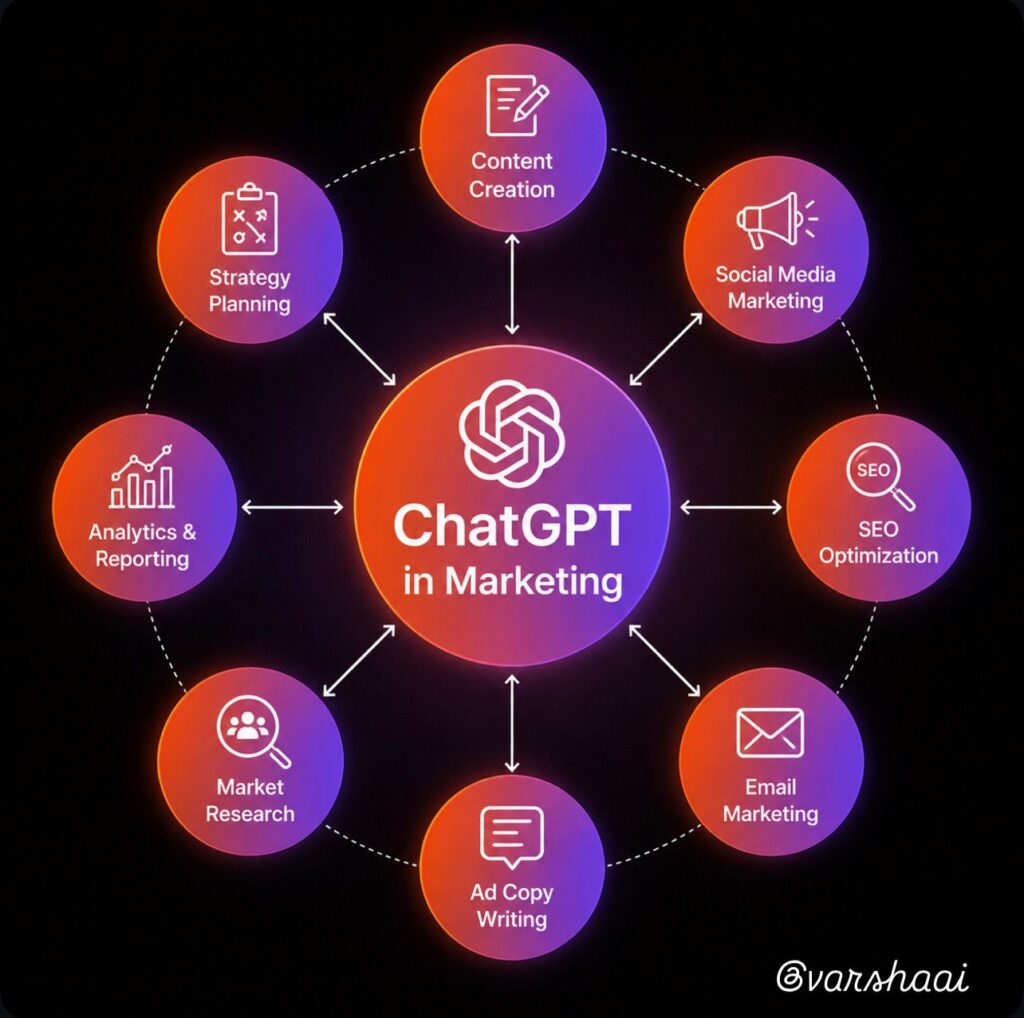
It works across every area of digital marketing. Content, SEO, email, social media, ads — ChatGPT has a practical role in all of them, which we’ll cover below.
Can You Really Use ChatGPT for Digital Marketing?
The short answer is yes.
But maybe not in the way most people imagine.
A lot of beginners think ChatGPT can simply take over their entire marketing process. That’s not how it works. The real value comes when you use it as an assistant rather than a replacement.
For example, instead of spending an hour brainstorming blog ideas, you can get a list of potential topics in minutes. Instead of staring at a blank screen trying to write social media captions, you can generate multiple versions and choose the one that fits your brand best.
That’s why so many marketers are now using ChatGPT for digital marketing. It helps reduce repetitive work, speeds up content creation, and gives you more time to focus on strategy and creativity.
The important part is knowing what to ask and how to guide the tool. Once you learn that skill, ChatGPT becomes far more useful than most people expect.
How to Use ChatGPT for Content Creation
This is where most people start — and honestly, it’s a great place to begin.
But here’s the thing: the way most beginners use ChatGPT for content is completely backwards. They type something like “write me a blog about AI tools” and then wonder why the output sounds robotic and generic.
The fix is simple. Give it context. Lots of it.
Compare these two prompts:
❌ “Write a blog about digital marketing.”
✅ “You are an experienced content marketer writing for beginners who are just discovering AI tools. Write a blog outline for the topic ‘How to Use AI for Social Media Marketing.’ Include 6 H2 sections with 2 subpoints each, a suggested word count per section, and the main keyword to target in each section.”
The second prompt gives ChatGPT everything it needs to produce something actually useful.
Prompts to Try
For blog topic ideas:
Suggest 20 beginner-friendly blog topics for a digital marketing website
focused on AI tools and SEO. Avoid generic titles — make them specific and
search-intent focused.
For blog outlines:
You are an SEO content strategist. Create a detailed blog outline for: “[Your Topic]”
Target audience: [describe your reader]
Include H1, 6 H2 sections, 2-3 H3 subpoints each, approximate word count
per section, and the primary keyword for each section.
Target total length: 2,000–2,500 words.
For refreshing old content:
Here is an existing blog post: [paste content]
Suggest specific improvements to update it for 2026 — focus on the intro,
outdated information, and adding new examples or data points.
One rule I always follow: Never publish ChatGPT’s output directly. Use it as a first draft, then rewrite in your own voice. Your personal examples and opinions are what make content worth reading — and what Google actually rewards.
ChatGPT vs Traditional Digital Marketing Workflow
One of the biggest reasons marketers are adopting AI tools is simple: they save time.
A task that used to take an hour often takes just a few minutes when ChatGPT helps with the first draft or planning stage.
Here’s a realistic comparison:
| Marketing Task | Traditional Method | With ChatGPT |
|---|---|---|
| Blog Topic Research | 30–60 Minutes | 5–10 Minutes |
| Blog Outline Creation | 45 Minutes | 5 Minutes |
| Social Media Captions | 30 Minutes | 3 Minutes |
| Email Subject Lines | 20 Minutes | 2 Minutes |
| Content Calendar Planning | 2–3 Hours | 20–30 Minutes |
Of course, you still need to review and improve the output. But starting with a rough draft is much faster than starting from a blank page.
This is where ChatGPT for digital marketing delivers its biggest advantage — it removes the slowest part of the process and helps you move faster without sacrificing quality.
How to Use ChatGPT for SEO
SEO and ChatGPT are a surprisingly good combination — once you understand what ChatGPT can and can’t do.
It can’t tell you your site’s domain authority or pull live keyword data. For that, you still need tools like Semrush or Ahrefs. But it’s genuinely excellent at content structuring, meta writing, FAQ generation, and figuring out search intent — which is honestly where a lot of SEO time gets spent anyway.
For a deeper look at AI and SEO together, check out our guide on How to Use AI for SEO.
Prompts to Try
For keyword research:
Suggest 20 long-tail keywords related to “ChatGPT for digital marketing”
that beginner marketers are likely searching for in 2026.
Group them by search intent: informational, navigational, transactional.
For meta titles and descriptions:
My blog topic is “[topic]” and my focus keyword is “[keyword].”
Write:
1. An SEO title tag under 60 characters (include focus keyword near the start)
2. A meta description between 150–160 characters (include focus keyword,
make it compelling enough to earn the click)
For FAQ sections:
Generate 8 FAQ questions that beginners commonly search about
“[your topic].” Include a concise answer for each (40–60 words),
written to target Google’s featured snippets and People Also Ask boxes.
For search intent analysis:
What is the search intent behind the keyword “[keyword]”?
What should a blog post include to fully satisfy that intent
and outperform existing content?
How to Use ChatGPT for Social Media Marketing
If there’s one area where ChatGPT saves the most day-to-day time, it’s social media. Coming up with fresh content ideas every single week is genuinely hard — especially when you’re also running everything else.
ChatGPT won’t replace your creativity here. But it will give you a starting point that you can shape into something that actually sounds like you.
Prompts to Try
For content ideas:
Give me 30 Instagram content ideas for a digital marketing blog
targeting beginners. Mix educational posts, quick tips, myth-busting content,
and engagement questions. Be specific — avoid vague ideas like “share a tip.”
For captions:
Write 5 Instagram captions about using AI tools for small business marketing.
Tone: friendly and conversational, not corporate.
End each caption with a question that encourages comments.
For repurposing blog content:
Turn this blog post into:
– 5 Instagram carousel slides (headline + 3 bullet points each)
– 3 LinkedIn posts (professional tone, strong opening hook, CTA at end)
– 1 Twitter/X thread (8 tweets, start with a bold statement)
Here is the blog post: [paste content]
For Reel scripts:
Write a 30-second Instagram Reel script about “[topic]” for beginners.
Include: a hook in the first 3 seconds, 3 key points,
and a CTA at the end. Keep it conversational — written for speaking, not reading.
How to Use ChatGPT for Email Marketing
Email marketing consistently delivers some of the highest ROI of any digital marketing channel. The challenge is that writing good emails — especially sequences — takes real time and creative energy.
ChatGPT handles the heavy lifting of drafting so you can focus on making it personal.
Prompts to Try
For subject lines:
Generate 15 email subject lines for a newsletter about AI marketing tools
targeting beginners. Mix curiosity-based, benefit-driven, and urgency angles.
Keep each under 50 characters.
For welcome email sequences:
Write a 5-email welcome sequence for new subscribers of a digital marketing blog
focused on AI tools.
For each email include:
– Subject line
– Preview text
– Full email body (warm, conversational, not salesy)
– One clear CTA
Goal: introduce the brand, build trust, and guide them to the most helpful content.
For promotional emails:
Write a promotional email for this blog post: [paste title and key points]
Target reader: beginner digital marketer
Highlight 3 key takeaways, keep the tone helpful not pushy,
and end with a clear CTA button suggestion.
How to Use ChatGPT for Content Planning
Most marketers think about ChatGPT for content creation. Fewer think about using it for content planning — which is honestly where some of the biggest time savings are hiding.
Prompts to Try
For content calendars:
Create a 30-day content calendar for a digital marketing blog focused on
AI tools and SEO. Include: weekly blog topics, daily social media post ideas,
and bi-weekly email newsletter topics. Organize by week.
For content clusters:
Suggest a content cluster strategy around the topic “AI for Digital Marketing.”
Include one pillar page topic and 8–10 supporting blog post ideas,
each targeting a specific long-tail keyword.
For internal linking:
Here are 10 blog posts from my website: [list titles]
Suggest the best internal linking opportunities between these posts
to improve SEO and guide readers through the content naturally.
ChatGPT Prompt Quick Reference
| Use Case | Prompt Starter |
|---|---|
| Blog outline | “You are an SEO content strategist. Create a detailed outline for…” |
| Keyword research | “Suggest 20 long-tail keywords related to… grouped by search intent” |
| Meta description | “Write an SEO title and meta description for… Focus keyword is…” |
| Social media ideas | “Give me 30 Instagram content ideas for… targeting beginners” |
| Email sequence | “Write a 5-email welcome sequence for… Include subject line, preview text, body, CTA” |
| Content repurposing | “Turn this blog post into Instagram carousels, LinkedIn posts, and a Twitter thread” |
| Reel script | “Write a 30-second Instagram Reel script about… with a hook in the first 3 seconds” |
Real-World Workflow: From Idea to Published Content
Here’s exactly how I’d use ChatGPT to take one blog post from idea to fully promoted content.
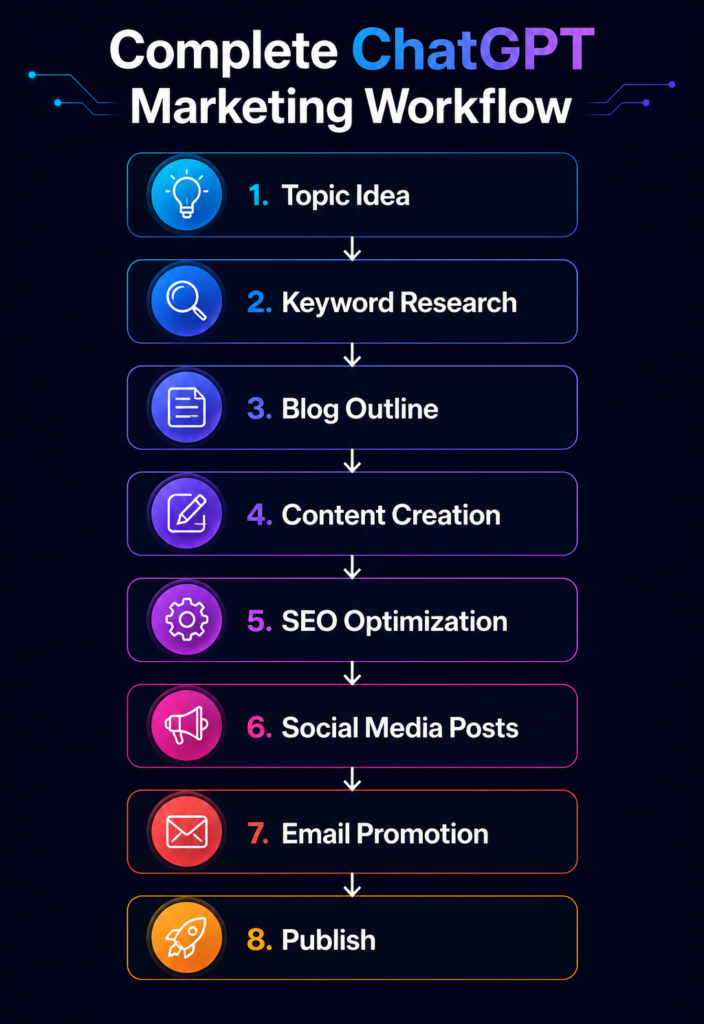
Step 1 — Generate the idea
Suggest 20 beginner-friendly blog topics about AI and digital marketing
that have strong search potential in 2026.
Step 2 — Build the outline
Create a detailed SEO blog outline for “[chosen topic].”
Target reader: complete beginner. Target length: 2,000 words.
Step 3 — Research reader questions
What are the most common questions beginners ask about [topic]?
List 10 and suggest where each fits in the article structure.
Step 4 — Create social media content
Turn this blog post into 5 Instagram captions and 3 LinkedIn posts.
Match the tone of the original article.
Step 5 — Write the email promotion
Write an email promoting this blog post to newsletter subscribers.
Highlight 3 key takeaways and suggest CTA button text.
This entire workflow — which used to take me a full day — now takes a couple of hours. The quality of the final output is still 100% on you. But ChatGPT handles the scaffolding.
ChatGPT Free vs ChatGPT Plus: What’s the Difference?
| ChatGPT Free | ChatGPT Plus | |
|---|---|---|
| Model access | Standard model | Latest models (GPT-4o and above) |
| Speed | Slower at peak times | Fast and consistent |
| Best for | Learning, basic tasks, brainstorming | Advanced content, complex workflows |
| Cost | Free | Paid monthly subscription |
Honestly? Start with the free version. Every use case in this guide works on the free plan. Once you’ve built ChatGPT into your regular workflow and you’re hitting limitations — that’s when upgrading makes sense.
Common Mistakes That Kill Your Results
Publishing without editing. This is the big one. AI-generated content without a human edit reads like AI-generated content. Always rewrite in your voice, add your own examples, and remove anything that sounds generic.
Using vague prompts. “Write something about marketing” will always produce something forgettable. Specificity is everything.
Trusting it blindly. ChatGPT occasionally gets facts wrong — confidently. Always verify statistics, dates, and specific claims before they go live on your site.
Forgetting your brand voice. ChatGPT doesn’t know how you sound. Tell it explicitly — or paste examples of your existing writing and ask it to match your style.
Expecting SEO results overnight. ChatGPT helps you create content faster, but SEO still takes consistent publishing, quality backlinks, and time. There’s no shortcut there.
Pros and Cons of Using ChatGPT for Digital Marketing
Like any tool, ChatGPT has strengths and limitations. Understanding both will help you use it more effectively.
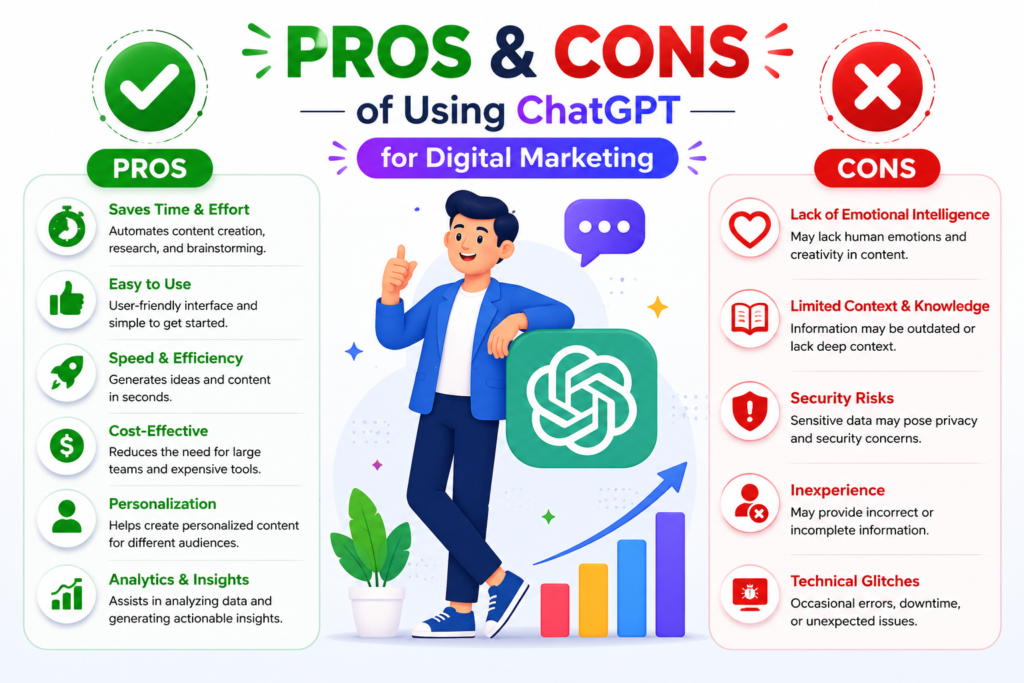
Pros
- Helps generate ideas quickly
- Saves time on repetitive tasks
- Makes content planning easier
- Useful for SEO, social media, email marketing, and blogging
- Affordable compared to many marketing tools
Cons
- Can occasionally provide incorrect information
- Doesn’t replace human creativity and experience
- Requires good prompts for quality results
- Content often needs editing before publishing
- Cannot replace real audience research
The best marketers don’t rely on ChatGPT completely. Instead, they combine AI-generated ideas with their own experience, expertise, and understanding of their audience.
That’s usually where the strongest results come from.
Can ChatGPT Replace Digital Marketers?
Short answer: No. And honestly, I think this question misses the point.
ChatGPT can help you create content faster. It can brainstorm ideas, draft copy, plan campaigns, and structure strategies. These are real, valuable things.
What it cannot do is understand your specific audience the way you do. It can’t build genuine relationships with your community. It can’t make the kind of creative judgment calls that come from years of experience. It doesn’t have your perspective — and your perspective is exactly what makes your marketing worth paying attention to.
The marketers who are winning right now aren’t the ones who use ChatGPT the most. They’re the ones who use it the smartest — letting AI handle speed and volume while they focus on quality, strategy, and authentic connection.
Frequently Asked Questions
Q1. How can beginners use ChatGPT for digital marketing?
Start simple — blog topic ideas, social media captions, email drafts, and basic keyword research. Focus on learning how to write specific prompts, because that’s what determines your output quality. Build one use case into your routine before moving to the next.
Q2. Is ChatGPT good for SEO?
Yes — it’s particularly useful for keyword brainstorming, content structure, meta titles and descriptions, FAQ sections, and search intent analysis. For comprehensive SEO strategy and live data, pair it with dedicated tools like Semrush or Ahrefs.
Q3. Can ChatGPT write full blog posts?
It can draft them — but you shouldn’t publish raw AI output. The best approach is using ChatGPT for outlines and first drafts, then rewriting with your own voice, examples, and expertise. That’s what Google rewards, and what readers actually enjoy reading.
Q4. Is ChatGPT free to use?
Yes. The free version handles most beginner use cases well. ChatGPT Plus (paid) gives you access to more advanced models, faster responses, and better performance for complex tasks — but it’s not necessary when you’re starting out.
Q5. Can ChatGPT help with social media content?
Absolutely. It’s one of the best use cases. You can generate weeks of Instagram captions, LinkedIn posts, hashtag sets, and Reel scripts in a single session. Just always edit to match your actual brand voice before posting.
Q6. What are ChatGPT’s main limitations for marketing?
No real-time data access, occasional factual errors, no automatic brand voice matching, and output that needs human editing before it’s publish-ready. Treat it as a smart first draft tool, not a finished product generator.
Conclusion
Here’s the truth about ChatGPT and digital marketing in 2026: it’s not magic, and it’s not going to do your job for you.
But used well? It’s genuinely one of the most useful tools a marketer can have.
The marketers who struggle with it are the ones who expect it to think for them. The ones who thrive are the ones who bring their own strategy, audience understanding, and creative voice — and then use ChatGPT to execute faster and think broader.
Start with one use case from this guide. Pick the one that feels most relevant to where you’re stuck right now — maybe that’s social media content, maybe it’s email sequences, maybe it’s finally getting a content calendar in place. Master that one thing. Build it into your routine. Then add the next.
That’s how you actually get value from this tool — not by trying to use it for everything all at once, but by letting it genuinely change one part of your workflow at a time.
If you found this guide useful, there’s a lot more where this came from. Check out our other resources on AI tools, SEO, and digital marketing — and subscribe to VarshaAI for weekly practical guides that skip the fluff and get straight to what works.
Related Articles
- What is Artificial Intelligence?
- What is Digital Marketing?
- What is AI-Powered Digital Marketing?
- How to Use AI for SEO
- Best AI Tools for Digital Marketing in 2026