Let me be honest with you.
Most people who start a website expect traffic to just… show up. They write a few posts, hit publish, and wait. Days pass. Then weeks. The analytics page shows the same three visitors — probably themselves.
That’s not a writing problem. That’s an SEO problem.
And the frustrating part? The fix isn’t complicated. SEO for beginners looks scary from the outside, but once you understand what’s actually happening, it clicks pretty fast.
This guide walks you through everything — what SEO is, how Google actually works, and what you should do first. No jargon. No fluff. Just what actually matters right now.
What Is SEO — And Why Should You Care?
SEO stands for Search Engine Optimization. But forget the fancy name.
It basically means this: making your website easy for Google to find, understand, and recommend to people who are searching for what you write about.
Here’s a simple way to think about it. Google is like a librarian managing billions of books. When someone walks in and asks a question, the librarian recommends the most helpful, trustworthy book they know. SEO is how you make sure your website is the one that gets recommended.
The best part? Once you rank, the traffic is free. No ads. No monthly budget. Just consistent visitors finding you through search.
That’s why learning SEO for beginners is genuinely worth your time.
Why SEO Still Matters
Some people say SEO is dying. It’s not. It’s changing — and that’s very different.
Here’s what’s actually happening:
- Google is getting smarter, not easier to fool
- AI-powered search results are changing how answers appear
- Competition online is higher than ever
- But helpful, well-structured content is still winning
If anything, the basics of SEO matter more now because shortcuts don’t work anymore. Google’s systems are good enough to tell the difference between content written for people and content written to game an algorithm.
The websites winning today are the ones publishing genuinely useful content, consistently, over time. That’s it.
How Google Actually Works
Before you optimize anything, you need to understand what’s happening behind the scenes.
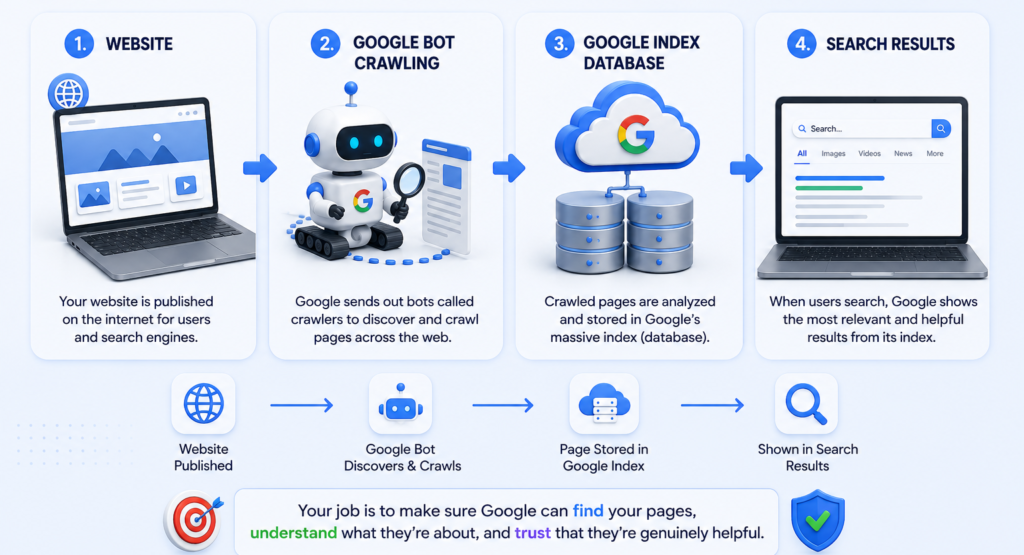
Crawling
Google sends out automated bots called crawlers. Think of them like scouts — they travel across the web, following links, and collecting information about every page they visit.
Indexing
After crawling, Google stores everything in a giant database called the index. This is basically Google’s catalog of the entire web. If your page isn’t in the index, it doesn’t exist in Google’s world — full stop.
Ranking
When someone searches for something, Google’s algorithm goes through the index and decides which pages best answer that query. Then it ranks them. The closer your page is to what the searcher actually needs, the higher you appear.
Simple as that. Your job is to make sure Google can find your pages, understand what they’re about, and trust that they’re genuinely helpful.
The 4 Types of SEO — Explained Simply
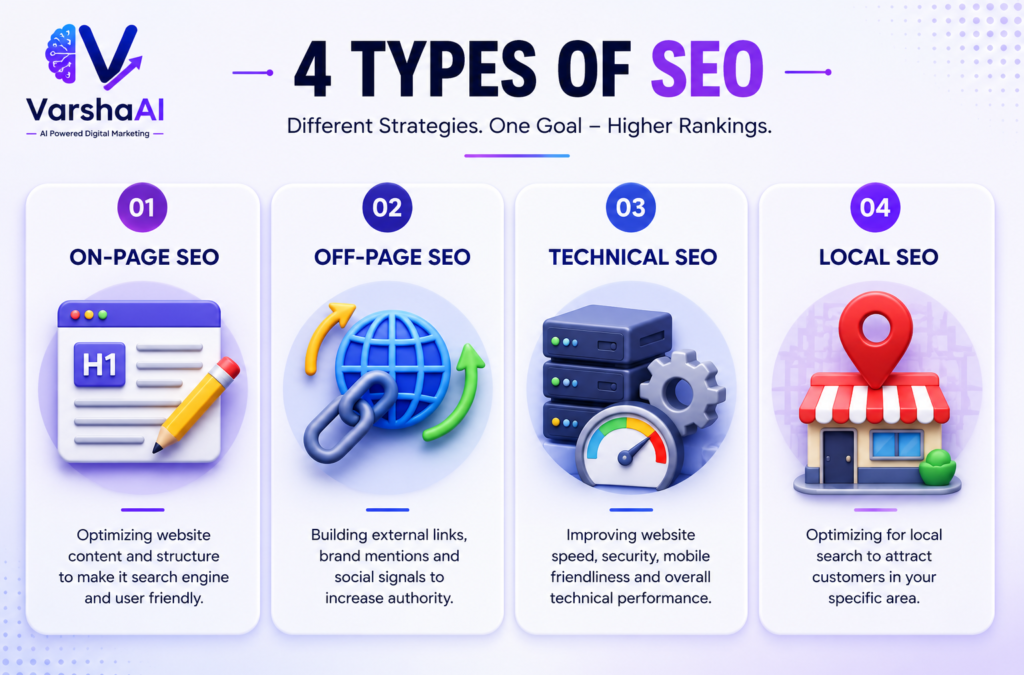
Most beginners think SEO is one thing. It’s actually four different things working together.
On-Page SEO
This is everything happening on your actual page — your keywords, headings, content, meta descriptions, internal links. This is where you should start. Get this right before worrying about anything else.
Off-Page SEO
This is your reputation outside your website. The main factor here is backlinks — when other websites link to yours, Google sees it as a vote of trust. More quality backlinks generally means more authority.
Technical SEO
This is the behind-the-scenes stuff — site speed, mobile-friendliness, how Google crawls your site. You don’t need to master this on day one, but a few basics can make or break your rankings.
Local SEO
If you run a local business, this one’s for you. It’s about showing up when someone searches “near me” or mentions a specific city. Setting up your Google Business Profile is the first step.
On-Page SEO: Where Beginners Should Start
This is the most important section in this entire guide. Seriously.
Most ranking improvements — especially for new websites — come from getting on-page SEO right. Not backlinks. Not technical audits. Just solid on-page basics.
Keywords: Stop Guessing, Start Researching
A keyword is what someone types into Google. Your job is to figure out what your audience is actually searching for — not what you think they’re searching for.
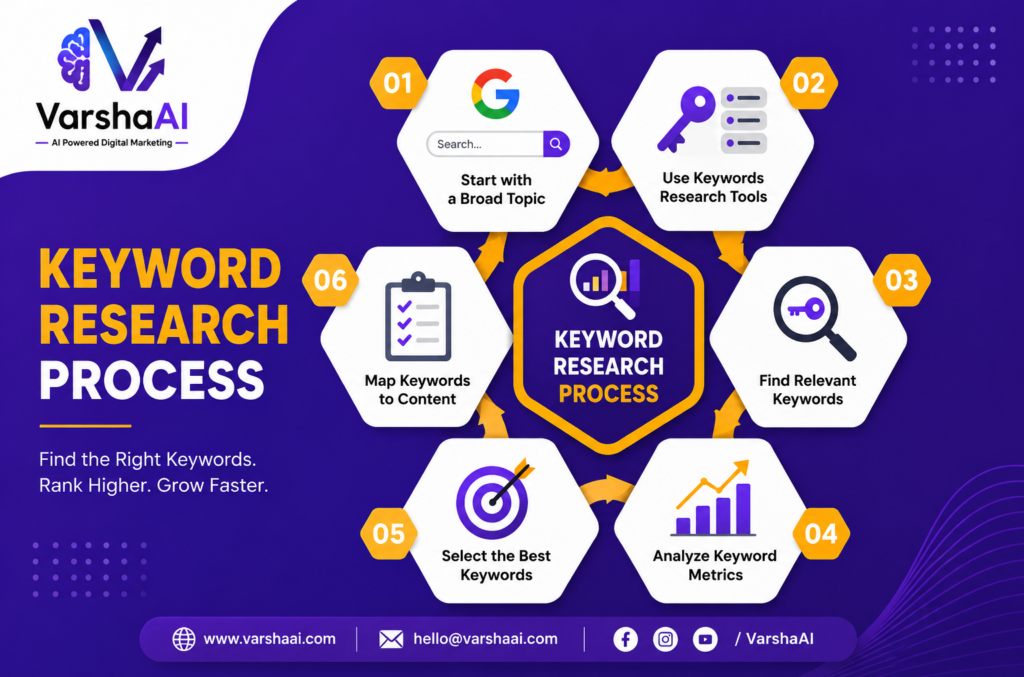
Big mistake most beginners make? Going after keywords that are way too competitive.
Trying to rank for “Digital Marketing” as a new website is like walking into the NBA as someone who just learned to dribble. You need to start smaller.
Instead of “SEO” — try “SEO for beginners step-by-step.” Instead of “Digital Marketing” — try “Digital marketing for small business owners.”
These specific phrases are called long-tail keywords. Less competition, more qualified visitors, faster results.
4 ways to find keywords without spending money:
Google Autocomplete — Start typing your topic into Google’s search bar. The suggestions that appear are real searches from real people. Pure gold for beginners.
Google Trends — Useful for comparing keywords and spotting topics that are growing before they get competitive.
Google Keyword Planner — Free tool that shows search volume and keyword ideas. Requires a Google Ads account but you don’t need to run any ads.
ChatGPT — Great for brainstorming keyword clusters and FAQ ideas quickly. Don’t rely on it for search volume data, but for generating angles and related topics it’s genuinely useful.
Titles and Headings — The Stuff People Actually See
Your title is the first thing someone sees in search results. If it doesn’t grab attention, they won’t click — and clicks matter.
Bad title: Website SEO Information
Good title: SEO for Beginners: Complete Guide to Getting Found on Google
The difference is obvious. One sounds like a filing cabinet label. The other sounds like something worth reading.
For headings — use one H1 per page with your main keyword. Then break your content into H2 sections and H3 subsections. This helps readers scan and helps Google understand your page structure.
Meta Descriptions — Don’t Skip These
A meta description is the short text that appears under your title in search results. It doesn’t directly boost rankings, but it absolutely affects whether someone clicks.
Keep it between 150–160 characters. Include your keyword. And most importantly — tell the reader what they’ll get.
Example: Learn SEO for beginners with keyword research, on-page tips, free tools, and a week-by-week action plan to improve your Google rankings
Writing Content That Actually Ranks
Here’s something that took a lot of people years to figure out: you’re not writing for Google. You’re writing for the person who typed that search query.
Google’s job is to find the best answer for that person. If you write the best answer, Google’s job becomes recommending you.
What helpful content actually looks like:
- Answers the question directly — don’t make people dig for it
- Uses real examples, not vague generalities
- Solves an actual problem
- Matches what the searcher was looking for — not what you assumed they wanted
Internal Links — The Most Overlooked Quick Win
Every new page you publish should link to 2–3 related pages on your site. This does two things: keeps readers on your site longer, and helps Google discover and understand your content. For example, this very guide links out to posts on AI for SEO and digital marketing basics — exactly the kind of internal linking that builds topical authority over time.
Image Optimization — Small Effort, Real Impact
Three things to do with every image:
Use descriptive file names. seo-beginners-guide.jpg tells Google something. IMG_4872.jpg tells Google nothing.
Add alt text. A short description of what the image shows. Helps with accessibility and gives Google context.
Compress before uploading. Large images slow your site down. Use TinyPNG — it’s free and takes 10 seconds.
Off-Page SEO: Building Trust Outside Your Website
You can have the best content in the world, but if no other website has ever linked to you, Google has no external reason to trust you yet.
That’s what off-page SEO fixes.
Backlinks — How They Actually Work
A backlink is a link from another website pointing to yours. Google treats this like a recommendation. If a respected website in your niche links to your article, Google sees that as a signal that your content is trustworthy.
One link from a relevant, respected website is worth more than fifty links from random low-quality sites. Quality over quantity — always.
Realistic ways to start building backlinks:
Write genuinely helpful content first. Guides, tutorials, checklists — things people actually want to share and reference. This is the foundation everything else builds on.
Guest blogging works. Find websites in your niche that accept guest posts. You provide a useful article, they give you a link back. Both sides win.
Get listed in relevant directories. Not spammy link directories — actual industry-specific or local directories that your audience uses.
Promote your content. Share on LinkedIn, relevant Facebook groups, Medium, and communities where your audience hangs out. More eyes on your content means more chances of earning organic links.
Technical SEO: The Basics You Actually Need
Technical SEO sounds intimidating. Most of it isn’t. Here’s what actually matters for beginners.
Site Speed
Slow websites lose visitors and rankings. Check yours for free at Google PageSpeed Insights. The quick wins: compress your images, use caching, and make sure your hosting isn’t terrible.
Mobile-Friendliness
Pull out your phone right now and look at your website. Can you read the text without zooming? Are the buttons easy to tap? Does it load quickly?
More than half of all Google searches happen on mobile. If your site is a mess on phones, you’re losing rankings and visitors simultaneously.
Indexing
Open Google and type site:yourwebsite.com. This shows you every page Google has indexed from your site. If important pages are missing — that’s a problem to fix in Google Search Console.
Site Structure
Think of your website like a building. A clear structure makes it easy for both visitors and Google to navigate.
Home
→ SEO Learning
→ AI Basics
→ Digital Marketing
→ Blogging Tips
Clean, logical, connected. Every article linking to related articles. This builds what’s called topical authority — Google starts to see your site as a reliable source on your main topics.
Google Search Console — Set This Up Today
Free. Directly from Google. Shows you exactly which keywords bring traffic, which pages rank, what technical issues exist, and whether Google can properly crawl your site.
If you do nothing else from this guide today — set up Google Search Console. Everything else becomes easier once you have real data.
How AI Can Help You With SEO
AI tools have genuinely changed how beginners approach SEO — mostly for the better.
Here’s where AI actually saves time:
- Brainstorming keyword clusters and topic ideas. If you want to learn practical AI optimization techniques, check out our AI for SEO guide.
- Creating content outlines before you write
- Drafting and improving meta descriptions
- Generating FAQ sections based on your topic
- Speeding up content optimization workflows
But here’s the honest part — AI is a tool, not a replacement for thinking. Google doesn’t care whether AI helped you write something. It cares whether the content is helpful, accurate, and trustworthy. Use AI to speed up your process, then add your own expertise and personality on top.
That combination is hard to beat.
Best Free SEO Tools for Beginners
You don’t need to spend a rupee to start learning SEO properly.
| Tool | What It Does | Free? |
|---|---|---|
| Google Search Console | Tracks performance, indexing, rankings | ✅ |
| Google Analytics | Shows who visits and how they behave | ✅ |
| Google Keyword Planner | Keyword research and search volume | ✅ |
| Google Trends | Spot growing topics early | ✅ |
| ChatGPT | Content ideas and optimization help | ✅ |
| Google PageSpeed Insights | Check and improve site speed | ✅ |
Start with Search Console and Analytics. Get comfortable with those two before adding anything else.
Week-by-Week SEO Action Plan for Beginners
Don’t try to do everything at once. This roadmap works.
Week 1 — Foundation Set up Google Search Console, Google Analytics, and submit your sitemap. Before doing anything else, make sure Google can actually see your site.
Week 2 — Planning Research keywords for your main topics. Plan your first few content pieces around specific, low-competition phrases.
Week 3 — First Optimized Post Publish your first fully SEO-optimized article. Proper title, meta description, headings, internal links, compressed images. Do it right once so you build the habit.
Week 4 — Fix and Improve Check Search Console for technical issues. Test your site on mobile. Improve any existing pages that are missing basic on-page elements.
Month 2–3 — Build Momentum Publish consistently. Start reaching out for backlinks. Update older content based on what Search Console data shows.
Month 4–6 — Grow Track ranking improvements. Double down on content that’s gaining traction. Expand into related topics to build topical authority.
One thing to accept early: SEO takes time. Three to six months before you see meaningful movement is normal — not a sign that something’s wrong. The websites that keep going are the ones that eventually win.
Common SEO Mistakes Beginners Make
These are the ones that slow people down the most — sometimes for months.
Going after keywords that are too competitive Every beginner does this. The fix is simple: add “for beginners,” “step by step,” or a specific location to make your target more specific and winnable.
Keyword stuffing Repeating your keyword every other sentence doesn’t help — it actively hurts. Write naturally. Use related terms. Google is smart enough to understand context.
Ignoring search intent If someone searches “how to learn SEO” they want a guide. If they search “best SEO tools” they want recommendations. Give people what they’re actually looking for, not what you assumed they wanted.
Publishing thin content A 300-word post rarely answers a topic fully. Go deep. Use examples. Cover the topic properly. Fewer, better posts outperform many shallow ones every time.
No internal links Every post you publish should connect to related posts on your site. It’s one of the easiest wins in SEO and most beginners completely ignore it.
Expecting results in two weeks SEO is a long game. Set a realistic expectation — three to six months for initial movement, six to twelve months to build real authority. Then stay consistent.
Skipping meta descriptions Leave it blank and Google writes one for you. Usually not great. Always write your own.
Forgetting mobile Check every post on your phone before publishing. Always.
SEO Trends Worth Knowing Right Now
AI-powered search is here Google understands meaning and context now, not just keywords. This actually makes good writing more valuable, not less.
Search intent is everything Matching exactly what the searcher is trying to accomplish is now one of the biggest ranking factors. Before writing anything, ask — what does this person actually want?
Topical authority beats random publishing Websites that consistently publish within a focused niche build trust faster than sites that jump between unrelated topics. Pick your lane and own it.
User experience signals matter Fast loading, mobile-friendly, easy to read — these aren’t just nice to have anymore. They directly affect rankings.
Fresh content gets rewarded Updating existing posts regularly signals relevance. Don’t just publish and forget — revisit and improve.
SEO Checklist: Before You Hit Publish
Before you click that publish button, run through this quick checklist — it takes two minutes and saves you from common mistakes that hurt rankings later.
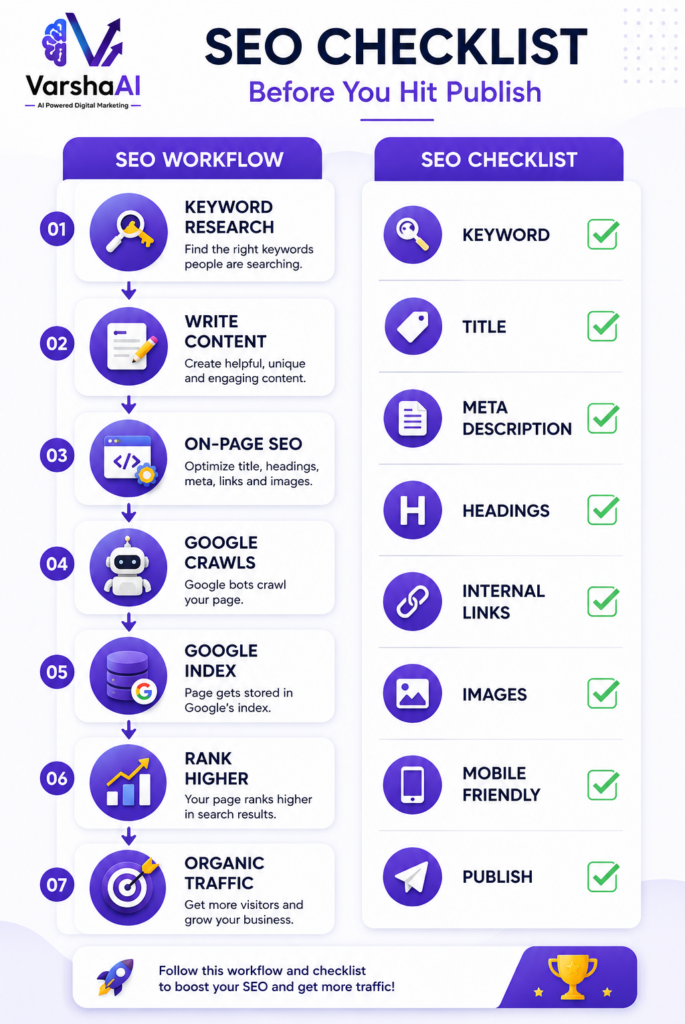
Keyword
- ✅ Focus keyword selected
- ✅ Used naturally in title, first paragraph, one H2
- ✅ Secondary keywords woven in without stuffing
Content
- ✅ Matches search intent
- ✅ Answers the question fully
- ✅ Real examples included
- ✅ No filler or padded sentences
On-Page
- ✅ SEO title under 60 characters
- ✅ Meta description 150–160 characters
- ✅ H1, H2, H3 structure correct
- ✅ 2–3 internal links added
Technical
- ✅ Images compressed and alt text added
- ✅ Mobile display checked
- ✅ Page speed acceptable
- ✅ URL clean and keyword-focused
Conclusion
SEO for beginners comes down to three things: create content people are genuinely searching for, make it easy for Google to understand, and build trust consistently over time.
That’s it. No tricks. No shortcuts. Just helpful content, properly structured, published consistently.
Start with keyword research. Get your on-page basics right. Set up Search Console and actually look at the data. Add internal links to everything. And then — keep going when it feels slow, because it always feels slow at first.
The effort you put into SEO today keeps paying off for months and years ahead. One optimized page at a time — that’s how every successful website got there.
Start now. You’re already ahead of everyone who’s still waiting for the perfect moment. If you’re new to digital marketing, read our Complete Digital Marketing Guide.
Frequently Asked Questions
What is SEO for beginners? SEO for beginners is learning how to optimize your website so Google can find it, understand it, and recommend it to people searching for your topic — without paying for ads.
How long does SEO take to work? Realistically, three to six months before you see meaningful movement. Competitive topics can take longer. Starting with specific, low-competition keywords speeds things up considerably.
Is SEO free? Yes. Organic traffic from SEO is free. You can start with zero budget using Google Search Console, Google Analytics, Google Trends, and Google Keyword Planner — all free.
Can complete beginners learn SEO? Absolutely. SEO has a learning curve but it’s not steep. The fundamentals are logical, and once they click, they apply to everything you publish going forward.
What’s the difference between SEO and SEM? SEO earns free traffic through optimization — it takes time but costs nothing per click. SEM involves paid ads like Google Ads — faster results but you pay for every visitor.
What are the best free SEO tools for beginners? Google Search Console and Google Analytics first — always. Then Google Keyword Planner and Google Trends for research. ChatGPT for brainstorming and content ideas.
Is SEO still worth learning today? Yes — more than ever. AI search is changing how results appear, but well-optimized, genuinely helpful content is still what ranks. The fundamentals haven’t changed, they’ve just gotten more important.
Can AI help with SEO? Yes, genuinely. AI tools save real time on keyword brainstorming, outlines, meta descriptions, and content optimization. Use them as a tool alongside your own expertise — not as a replacement for it.
Want to understand AI before using it for SEO? Read our AI Beginner’s Guide.
Related Reads
Want to go deeper? Here’s where to head next:
How to Use AI for SEO — see exactly how AI fits into keyword research and content optimization.
How to Use ChatGPT for Digital Marketing — practical ways to speed up content, emails, and campaigns.
What Is Digital Marketing? — the basics, explained simply, if you’re starting from zero.
What Is Artificial Intelligence (AI)? — real-world examples, no jargon.