

If you’ve ever published a post and watched it sit on page five of Google forever, you already know good writing alone isn’t enough. To get found, you need to write SEO-friendly blog posts — content built for both readers and search engines.
You don’t need to be a technical expert to do this well, just a repeatable process. This guide covers exactly how to plan, structure, and optimize SEO-friendly blog posts that have a real shot at ranking, using current Google ranking factors rather than outdated tricks like keyword stuffing.
What Are SEO-Friendly Blog Posts?
SEO-friendly blog posts are articles structured and written to satisfy both search engines and human readers. They target a clear focus keyword, answer the searcher’s question thoroughly, and follow on-page SEO best practices like clean headings, internal links, and fast-loading pages.
In short: they’re built to be found, and built to be useful once someone finds them.
Why SEO-Friendly Blog Posts Matter for Google Rankings
Google’s ranking systems no longer reward content that simply repeats a keyword. Instead, modern Google ranking factors prioritize search intent, depth, and trustworthiness — often grouped under the term E-E-A-T (Experience, Expertise, Authoritativeness, Trustworthiness).
Here’s why this still makes SEO-friendly blog posts worth the effort:
- They help search engines understand what your page is actually about.
- They improve user experience, which keeps people reading longer.
- They build topical authority over time, which compounds across your whole site.
- They create consistent, compounding organic traffic instead of one-off spikes.
Skip the structure, and even genuinely useful content can get buried. That’s the real cost of ignoring on-page SEO.
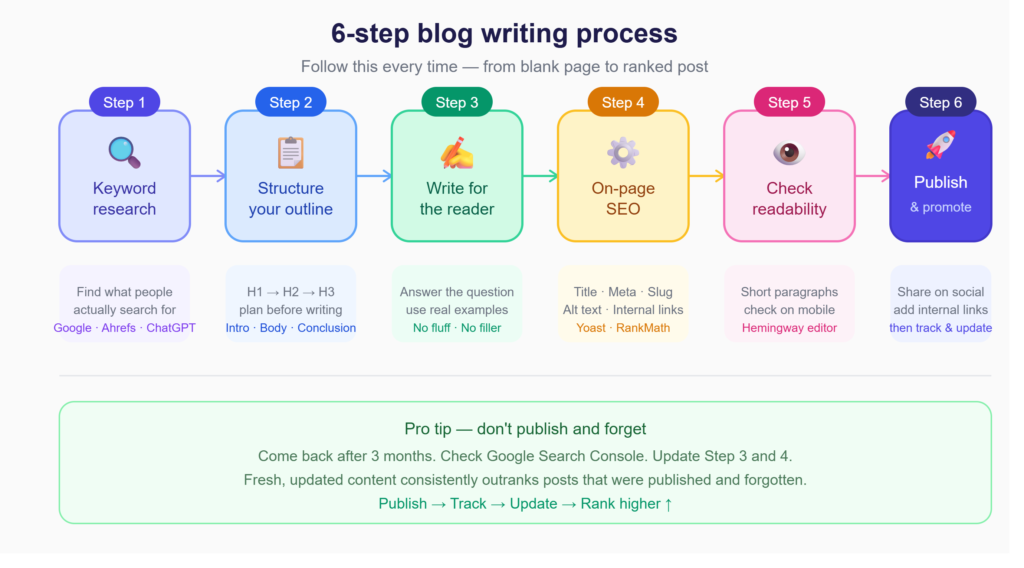
Step 1: Perform Keyword Research
Every strong piece of SEO content writing starts with keyword research. Before writing a sentence, figure out what your audience is actually typing into Google.
A simple process:
- Start with a broad topic idea related to your business.
- Use a tool like Ahrefs or Semrush to find related search terms.
- Note the search volume, ranking difficulty, and intent behind each term.
- Pick one focus keyword and 5–8 supporting secondary keywords.
For example, if your focus keyword is “SEO-friendly blog posts,” secondary terms like SEO blog writing and content optimization help Google understand the full topic — without repeating the exact phrase over and over.
Step 2: Create SEO-Friendly Blog Posts with a Clear Structure
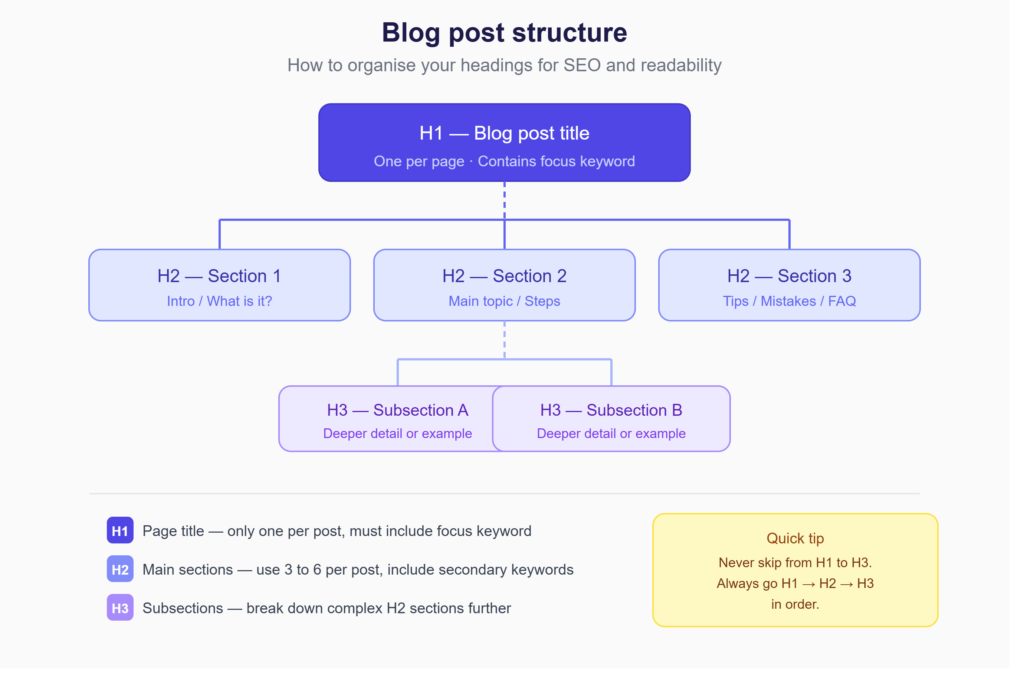
Once you have your keywords, map out your structure before writing. A clear blog structure helps readers scan quickly and signals topic organization to search engines through your headings.
A solid structure typically includes:
- One H1 containing your focus keyword
- Multiple H2s breaking the post into logical steps
- H3s where a section needs further breakdown
- An introduction stating what the reader will learn
- A conclusion reinforcing the key takeaway
This is also where good on-page SEO begins — long before you write a final paragraph. For a deeper look at SEO basics and planning, check out our SEO Beginner’s Guide.
Step 3: Write High-Quality Content for Users
This is the step many writers rush past. Search engine optimization only works if the content underneath it is genuinely good. Google’s quality systems are built to detect thin, repetitive, or padded writing.
To write content that holds up:
- Answer the reader’s actual question in the first few sentences of each section.
- Use specific examples, not vague generalizations.
- Avoid filler phrases that add length without adding value.
- Back up claims with real data or firsthand experience where possible.
This is where EEAT signals matter most. A post written by someone with real, demonstrable experience consistently outperforms generic, surface-level content — even when both target the same keyword.
Free Tools That Make SEO Blog Writing Easier
You don’t need expensive software to write well-optimized posts. These free tools cover most of what beginners actually need:
| Tool | What It Helps With | Free? |
|---|---|---|
| Yoast SEO / RankMath | On-page SEO checks inside WordPress | ✅ |
| Google Search Console | See which keywords your post ranks for | ✅ |
| Hemingway Editor | Improve readability and sentence clarity | ✅ |
| Google Keyword Planner | Find search volume for your keywords | ✅ |
| TinyPNG | Compress images before uploading | ✅ |
| ChatGPT | Brainstorm outlines, headings, and FAQs | ✅ |
Start with Yoast or RankMath inside WordPress — it gives you a real-time checklist as you write, which is genuinely useful when you’re still building the habit.
My Biggest Lesson
One lesson I’ve learned while building content is that publishing more articles doesn’t automatically increase traffic.
In many cases, a smaller number of well-optimized, genuinely helpful blog posts performs far better than publishing dozens of average-quality articles.
I’ve found that spending extra time improving one article—adding examples, refining the structure, and making it more useful for readers—often delivers better long-term results than rushing to publish several average posts.
Quality builds trust, and trust is what ultimately drives sustainable organic growth.
Step 4: Optimize On-Page SEO Elements
On-page SEO is the technical layer that helps Google correctly interpret what you’ve written. Once your draft is solid, run through this checklist:
- Title tag: Include the focus keyword near the beginning, under 60 characters.
- Meta description: Summarize the post’s value in 150–160 characters, including the focus keyword and a clear benefit.
- URL slug: Keep it short and keyword-focused, like /seo-friendly-blog-posts.
- Headings: Use the focus keyword in at least one H2.
- Image alt text: Describe each image accurately, working in relevant keywords naturally.
These elements reinforce each other, telling Google exactly what your page is about.
Step 5: Improve Readability and User Experience
A technically optimized post that’s hard to read still won’t perform well, because Google measures how users behave on your page. If readers bounce immediately, that signals your content didn’t satisfy their intent.
Practical ways to improve readability:
- Keep paragraphs to 2–4 lines.
- Write most sentences under 20 words.
- Use bullet points and numbered lists to break up dense information.
- Add transition words (“however,” “for example,” “as a result”) to guide the reader.
- Aim for a Flesch Reading Score of 60 or higher.
These habits aren’t just stylistic — they directly affect how long people stay on your page, which feeds back into rankings.
Step 6: Add Internal and External Links
Linking is one of the simplest, most overlooked blog SEO tips. Internal links connect readers and search engines to other relevant pages on your site, distributing authority and keeping visitors engaged longer. For example, you might link this post to your SEO basics guide, a related post on how to use AI for SEO, or your most comprehensive piece on the topic you’re covering..
External links to authoritative sources strengthen your credibility. Linking out to resources like Google Search Central shows readers — and Google — that your content is well-researched, not written in isolation.
Aim for 3–5 internal links and 2–3 external links per post, placed naturally where they add genuine context.
Common Mistakes to Avoid
Even experienced writers fall into these traps when producing SEO content writing:
- Keyword stuffing: Repeating your focus keyword unnaturally hurts readability and can trigger quality filters.
- Ignoring search intent: Writing a listicle when searchers want a how-to guide (or vice versa) tanks engagement.
- Skipping meta descriptions: Leaving this blank means Google generates one for you, often poorly.
- Walls of text: No subheadings, no lists, no breathing room — readers leave before finishing.
- Forgetting mobile users: Most searches happen on mobile, so test how your post actually reads on a phone screen.
Avoiding these mistakes is often more impactful than chasing the latest SEO trend.
A Real Example: Same Topic, Two Very Different Results
Here’s something that makes this click faster than any checklist.
Take two posts targeting the same keyword — “how to write blog posts.”
Post A: 400 words, no clear structure, keyword stuffed into every paragraph, no internal links, published and forgotten.
Post B: 1,500 words, clear H2 sections, focus keyword used naturally 10–12 times, two internal links to related posts, meta description written properly, images compressed.
Same topic. Same keyword. Completely different outcomes on Google.
Post B isn’t better because of tricks. It’s better because it actually answers the question, makes it easy for Google to understand the page, and gives the reader a reason to stay.
That’s the whole game. Everything in this guide is just a structured way to consistently produce Post B.
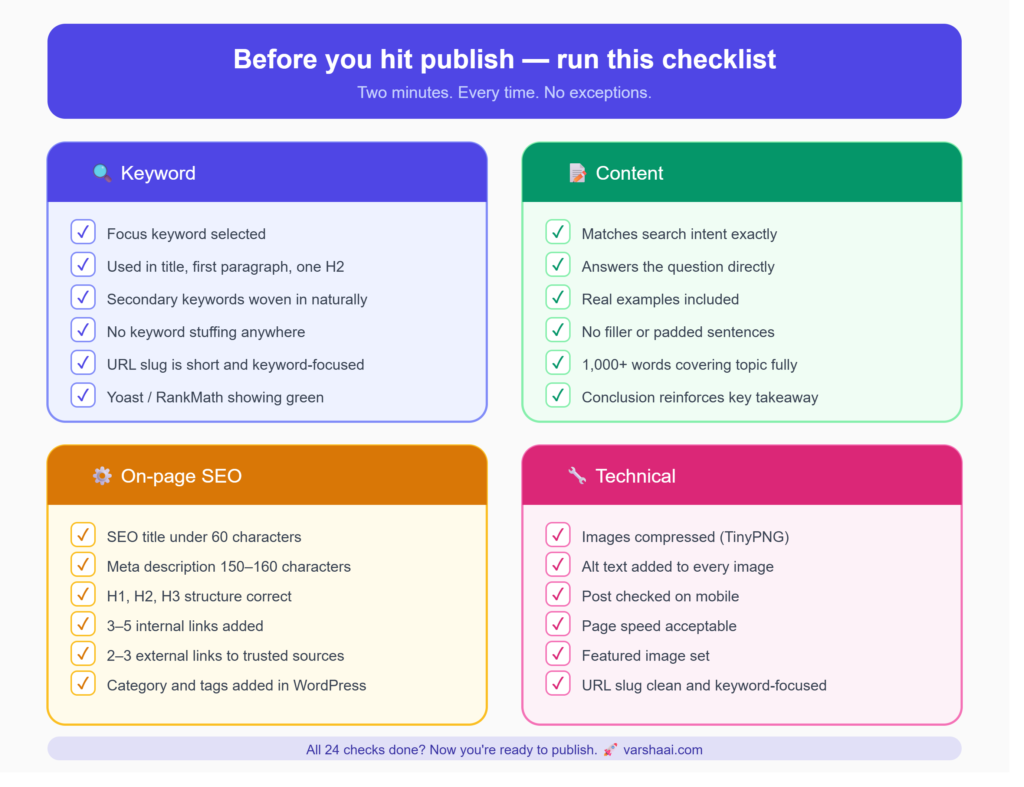
Quick Checklist Before You Hit Publish
Run through this before every post goes live. It takes three minutes and catches most of the mistakes that quietly kill rankings:
Keyword
- ✅ Focus keyword selected before writing
- ✅ Used in title, first paragraph, and at least one H2
- ✅ Secondary keywords woven in naturally — not forced
- ✅ No keyword stuffing anywhere
- ✅ URL slug is short and keyword-focused
- ✅ Yoast / RankMath showing green
Content
- ✅ Matches search intent exactly
- ✅ Answers the reader’s actual question — not a vague version of it
- ✅ Specific examples included, not just general advice
- ✅ No filler sentences that add length without adding value
- ✅ 1,000+ words covering the topic fully
- ✅ Conclusion reinforces the key takeaway
On-Page
- ✅ SEO title under 60 characters
- ✅ Meta description between 150–160 characters
- ✅ H1, H2, H3 structure is correct
- ✅ At least 3–5 internal links added
- ✅ 2–3 external links to trusted sources
- ✅ Category and tags added in WordPress
Technical
- ✅ Images compressed using TinyPNG
- ✅ Alt text added to every image
- ✅ Post checked on mobile before publishing
- ✅ Page speed acceptable
- ✅ Featured image set
- ✅ URL slug clean and keyword-focused
Conclusion
Writing SEO-friendly blog posts isn’t about gaming an algorithm — it’s about combining solid keyword research, clear structure, genuinely useful content, and the on-page SEO details that help Google understand and trust your page. Work through these six steps consistently, and your posts will be built to perform for both readers and search engines, today and as ranking factors continue to evolve.
Related Reads
If this guide was useful, here’s where to go next:
SEO for Beginners: Complete Guide to Getting Found on Google — start here if you want to understand how SEO actually works before diving into blog writing specifics.
How to Use AI for SEO — practical ways AI can speed up your keyword research, outlines, and content optimization.
How to Start a Blog and Get Your First 1,000 Visitors — if you’re still in the early setup stage, this one covers the full foundation.
What Is Digital Marketing? — SEO is one piece of a bigger picture. This explains how it all fits together.
Frequently Asked Questions
What makes a blog post SEO-friendly? An SEO-friendly blog post targets a clear focus keyword, matches what the searcher actually wants to know, and follows on-page SEO basics — strong headings, a concise meta description, internal links, and easy readability.
How many keywords should I use in a blog post? Focus on one primary keyword used naturally 8–12 times across a 1,000-word post, supported by 5–10 related secondary keywords. Beyond that, prioritize natural language over repetition — Google’s systems reward relevance, not frequency.
What is the ideal blog length for SEO? There’s no universal magic number, but in-depth posts of 1,000–2,000 words tend to perform well for informational topics because they have room to fully answer the searcher’s question. Match length to what the topic genuinely requires.
How important are internal links for SEO? Very. Internal links help search engines discover and understand your site’s structure, distribute ranking authority across pages, and keep readers engaged longer — all of which support better rankings over time.
Can AI-written content rank on Google? Yes, as long as it’s genuinely helpful, accurate, and edited for quality. Google doesn’t penalize content for being AI-assisted; it penalizes content that’s thin, inaccurate, or unhelpful regardless of how it was produced.