Many beginners publish great blog posts but still struggle to rank on Google because they overlook basic on-page SEO elements. They spend hours crafting the perfect sentence, then hit publish without ever checking if the title tag is optimized, if there’s a meta description, or if images are compressed. The content is good — but Google never gets the full picture.
That’s exactly what this guide fixes. Below is a complete on-page SEO checklist you can run through before publishing every single blog post, along with honest explanations of why each step matters — not just what to do. If you’re new to blogging altogether, it’s worth pairing this with a guide on how to start a blog so your foundation is solid before you start optimizing.
What You’ll Learn
- ✅ Understand what an On-Page SEO Checklist is
- ✅ Learn every important optimization step
- ✅ Improve rankings with better on-page SEO
- ✅ Avoid beginner SEO mistakes
- ✅ Optimize every blog before publishing
- ✅ Use free SEO tools effectively
What Is an On-Page SEO Checklist?
An on-page SEO checklist is a step-by-step list of optimization tasks performed directly on a webpage — such as keyword placement, meta descriptions, headings, and image optimization — to improve search visibility, rankings, and user experience. If you’re still getting comfortable with the fundamentals, our SEO for beginners guide is a good place to start before diving into this checklist.
Why This On-Page SEO Checklist Matters
It’s tempting to think that if you write genuinely helpful content, rankings will just follow. Content quality absolutely matters — but Google still needs technical and structural signals to understand, trust, and properly display your page.
Google rankings are influenced by how clearly your page communicates its topic through titles, headings, and structure — not just the words in your paragraphs.
User experience has become a direct ranking factor. Pages that load slowly, aren’t mobile-friendly, or are hard to read tend to lose rankings even with strong content.
Search intent must be matched at a structural level too — your headings and page layout should make it obvious, at a glance, that your page answers the searcher’s exact question.
Helpful content and EEAT (Experience, Expertise, Authority, Trust) are central to how Google evaluates pages today. On-page SEO is how you demonstrate these signals in a format Google and readers can both quickly recognize. Google’s own SEO Starter Guide covers these fundamentals directly if you want the source material.
Organic traffic compounds when on-page SEO is done consistently. A single optimized post might bring modest traffic, but dozens of properly optimized, interlinked posts build long-term authority that keeps growing. This is also where keyword research for beginners pays off, since a solid keyword foundation makes every future post easier to optimize.
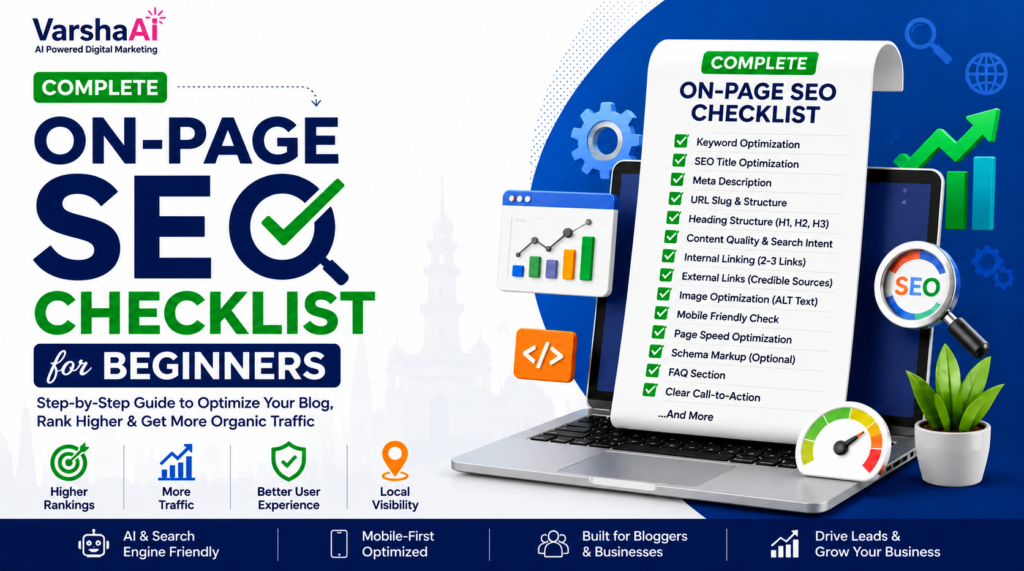
Complete On-Page SEO Checklist
Here’s every major on-page SEO element, explained in plain language.
1. On-Page SEO Checklist: Keyword Optimization
Focus keyword: This is the single main phrase your article is built around — in this case, “on-page SEO checklist.” It should represent exactly what someone would type into Google to find this article.
Secondary keywords: These are closely related terms and variations (like “SEO checklist,” “on-page SEO for beginners”) that you weave in naturally throughout the article. They help Google understand the broader context and let you rank for multiple related searches.
Keyword placement: Your focus keyword should appear in your H1, within the first 100 words, in at least a few H2 headings, and in your conclusion — but only where it reads naturally. Forcing it in awkward spots hurts readability and doesn’t help rankings.
2. On-Page SEO Checklist: SEO Title
Your SEO title is often the very first thing a searcher sees. It needs to include your focus keyword, stay under roughly 60 characters, and give a clear reason to click — without becoming clickbait.
3. On-Page SEO Checklist: Meta Description
This short summary (150–160 characters) appears under your title in search results. It doesn’t directly boost rankings, but a compelling meta description significantly improves your click-through rate, which indirectly supports your SEO performance.
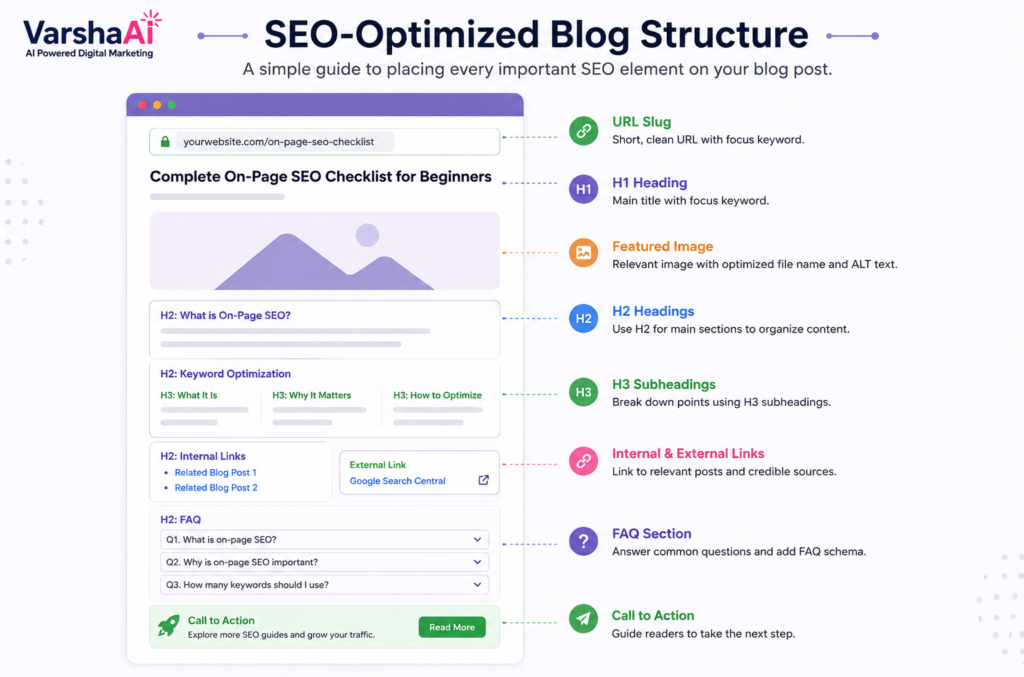
4. On-Page SEO Checklist: URL Slug
A clean, short URL that includes your focus keyword (e.g., /on-page-seo-checklist) is easier for both Google and users to understand than a long, auto-generated string of numbers and words.
5. On-Page SEO Checklist: Heading Structure (H1, H2, H3)
- H1: One per page. This is your main title and should contain your focus keyword.
- H2: Used for major sections. Helps Google (and readers) scan your structure.
- H3: Used for sub-points within an H2 section.
A clear heading hierarchy makes your content skimmable, which matters enormously — most readers scan before they commit to reading.
6. Content Quality & Search Intent
Your content needs to genuinely satisfy what the searcher wants. If they’re looking for a checklist, give them a checklist — not three paragraphs of history before you get to the point. Match the format to the intent, not just the topic. If you want a deeper dive into structuring posts this way, see how to write SEO-friendly blog posts.
This is easiest to see side by side — imagine an unoptimized post (no headings, no meta description, wall-of-text paragraphs) next to the same post after applying this checklist (clear H2s, compressed images, scannable formatting). That “Before vs After” contrast is one of the infographics suggested at the end of this guide, and it’s worth creating since it makes the value of on-page SEO instantly visible to readers.
7. Internal Links
Linking to your own related articles (like a keyword research guide or a beginner SEO guide) helps Google understand how your content connects, strengthens topical authority, and keeps readers exploring your site longer.
8. External Links
Linking out to credible, authoritative sources — like Search Engine Journal’s on-page SEO guide — signals trust and gives readers additional value. It doesn’t “leak” your rankings, contrary to a common myth. Mix sources rather than citing the same one twice; it signals you’ve actually researched the topic broadly, not just paraphrased one page.
9. Image Optimization
- ALT text: Describes the image for accessibility and helps Google understand image content (and can drive image search traffic).
- File names: Use descriptive names (
on-page-seo-checklist.png) instead of generic ones (IMG_2031.png). - Compression & WebP format: Smaller, modern image formats load faster, directly improving page speed and user experience.
10. Mobile Friendliness
The majority of search traffic today comes from mobile devices, and Google evaluates your mobile version first. Test how your page looks and behaves on a phone before publishing. Google’s Search Console will flag mobile usability issues directly if any exist.
11. Page Speed
Slow-loading pages frustrate users and hurt rankings. Compressing images, avoiding heavy unnecessary scripts, and using a decent hosting provider all contribute here. Pairing a fast page with genuinely well-structured writing — see how to write SEO-friendly blog posts — gives you the best of both technical and content-side SEO.
12. Readability
Short paragraphs, simple sentences, and clear formatting keep readers engaged. If your content is technically optimized but exhausting to read, people bounce — and Google notices that too.
13. Schema Markup
Structured data (like FAQ schema or article schema) helps Google display rich results — like FAQ dropdowns directly in search results — which can significantly boost your visibility and click-through rate. Here’s a minimal FAQ schema example you can adapt for your own FAQ section:
{
  "@context": "https://schema.org",
  "@type": "FAQPage",
  "mainEntity": [{
    "@type": "Question",
    "name": "What is on-page SEO?",
    "acceptedAnswer": {
      "@type": "Answer",
      "text": "On-page SEO refers to optimization tasks done directly on a webpage to improve search visibility and user experience."
    }
  }]
}
Bonus tip — featured snippets: Google often pulls a short, direct answer (40–55 words) right after an H2 or H3 to fill the “featured snippet” box at the top of results. If you answer the heading’s implied question in a tight paragraph before going into detail, you give Google an easy, ready-made snippet to lift — which is one of the highest-visibility spots on the page.
14. Table of Contents
Especially useful for longer guides, a table of contents improves navigation and can help your page earn “jump to section” links in Google search results.
15. FAQ Section
A well-written FAQ section answers common related questions, targets additional long-tail keywords naturally, and is a strong candidate for FAQ schema markup.
16. Call-to-Action
Every article should guide the reader toward a next step — reading another post, subscribing, or trying a tool. This improves engagement metrics and gives your content real purpose. If you’re building out a content strategy around AI-assisted writing, our guide on how to use AI for SEO is a natural next read.
On-Page SEO Checklist: Mistakes Beginners Should Avoid
- Keyword stuffing — repeating your focus keyword unnaturally hurts readability and can actually trigger spam-related ranking issues
- Multiple H1 tags — confuses Google about your page’s actual main topic; stick to one H1 per page
- Missing meta description — Google will auto-generate one from your content, which is usually far less compelling than one you write yourself
- Long, messy URLs — auto-generated URLs full of numbers or stop words hurt both clarity and click appeal
- No internal links — isolated pages miss out on shared authority and lower overall site engagement
- Huge, uncompressed image sizes — one of the most common (and easily fixable) causes of slow page speed
- Ignoring mobile users — a page that looks great on desktop but breaks on mobile will underperform, since Google evaluates mobile experience first
- Thin content — pages that technically check every SEO box but don’t genuinely answer the reader’s question rarely hold their rankings for long
How to Check If Your On-Page SEO Is Working
Optimizing a post is only half the job — the other half is checking whether it’s actually paying off. This is where Google Search Console becomes essential, since it’s the most direct way to see how Google itself is treating your page. A few metrics worth watching for every post you optimize:
- Impressions — how often your page shows up in search results. Rising impressions usually mean Google is starting to understand and surface your content for relevant queries.
- Click-Through Rate (CTR) — the percentage of people who see your listing and actually click. A low CTR despite decent impressions often points back to a weak title tag or meta description.
- Average Position — roughly where your page tends to rank for its target queries. This helps you see whether your on-page changes are nudging you up over time.
- Organic Traffic — the real-world outcome of everything above. This is the number that ultimately tells you whether your on-page SEO checklist is working.
Check these numbers two to four weeks after publishing or updating a post, rather than the next day — rankings and impressions need time to settle before they mean anything.
My Biggest Observation
One thing I’ve noticed is that beginners often focus only on adding keywords while forgetting the overall reading experience. Google rewards pages that genuinely help readers, not pages that simply repeat the same keyword over and over. On-page SEO works best as a support structure around genuinely useful content — not as a replacement for it.
Another thing I often notice is that many beginners spend hours writing a great article but forget simple on-page SEO elements like image alt text or internal links. Small details like these can make a noticeable difference over time, especially as your site accumulates more pages that all reinforce each other.
On-Page SEO Workflow
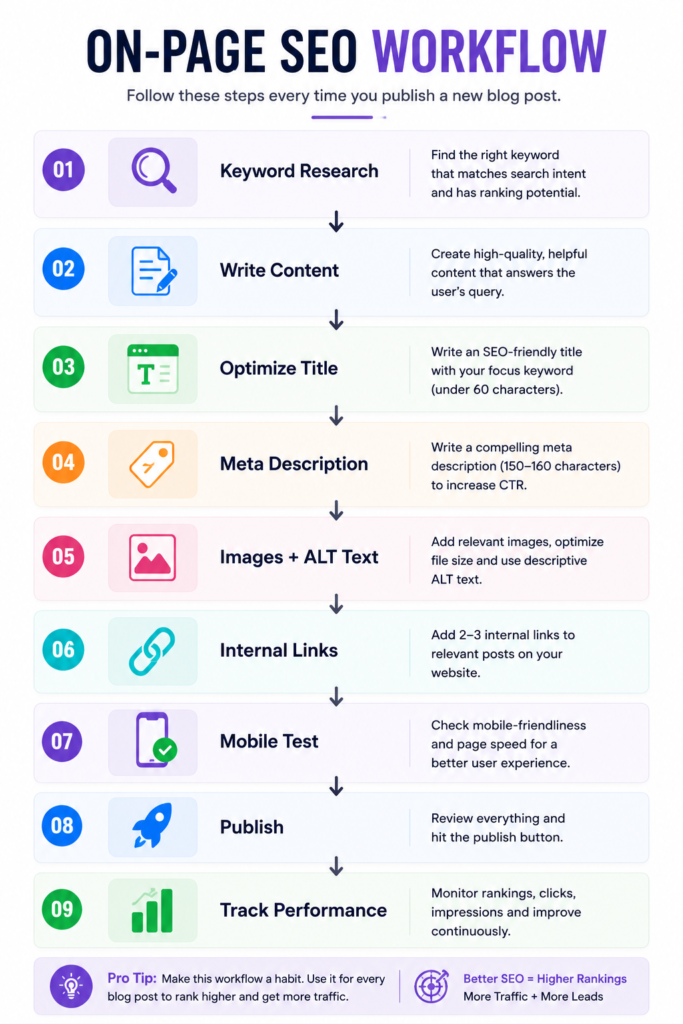
Following this workflow consistently — rather than optimizing randomly after the fact — makes on-page SEO feel like a natural part of your writing process instead of an extra chore.
Note: the flow above is shown as text for now — swap it for the “On-Page SEO Workflow” infographic (see Image Suggestions below) once it’s designed, since ASCII diagrams don’t render consistently across every CMS or theme.
Free Tools to Check On-Page SEO
Rank Math
- Best for: All-in-one on-page SEO analysis directly inside WordPress
- Pros: Real-time scoring, schema support, beginner-friendly suggestions
- Cons: Some advanced features are locked behind the paid version
- Free plan: Yes, generous free tier
Yoast SEO
- Best for: WordPress users wanting a well-established, widely documented SEO plugin
- Pros: Clear readability and SEO analysis, huge community support
- Cons: Interface can feel a bit dated compared to newer plugins
- Free plan: Yes
Google Search Console
- Best for: Tracking real rankings, clicks, impressions, and mobile usability issues
- Pros: Direct data from Google itself, completely free, essential for tracking progress
- Cons: Takes time to accumulate meaningful data for new sites
- Free plan: Fully free
- Official link: search.google.com/search-console
PageSpeed Insights
- Best for: Diagnosing page speed and Core Web Vitals issues
- Pros: Free, detailed, gives specific fix recommendations
- Cons: Can be technical for complete beginners to fully act on
- Free plan: Fully free
TinyPNG
- Best for: Quickly compressing images before uploading
- Pros: Simple drag-and-drop, noticeably reduces file size with minimal quality loss
- Cons: Batch limits on the free version
- Free plan: Yes, with daily limits
ChatGPT
- Best for: Brainstorming meta descriptions, FAQ questions, and checking readability
- Pros: Fast, flexible, good for rewriting awkward sentences
- Cons: Doesn’t replace real SEO data tools — use it for drafting, not verification
- Free plan: Yes, with usage limits
Grammarly
- Best for: Catching grammar issues and improving overall readability
- Pros: Easy browser integration, real-time suggestions
- Cons: Free version has limited advanced style suggestions
- Free plan: Yes
🖨️ Printable On-Page SEO Checklist
Print this section or save it as an image/PDF and keep it next to your writing setup. Run through it every time before you hit publish.
┌─────────────────────────────────────────────┐
│   ON-PAGE SEO CHECKLIST — PRE-PUBLISH        │
├─────────────────────────────────────────────┤
│ ☐ Focus keyword in title                     │
│ ☐ Focus keyword in H1 and key H2s            │
│ ☐ Meta description added (150–160 chars)     │
│ ☐ URL slug optimized and short                │
│ ☐ Images compressed (WebP where possible)    │
│ ☐ ALT text added to every image              │
│ ☐ Internal links included (2–3 minimum)      │
│ ☐ External links to credible sources         │
│ ☐ Mobile version tested                      │
│ ☐ Readability checked (short paragraphs)     │
│ ☐ FAQ section added                          │
│ ☐ Schema markup enabled                      │
│ ☐ Table of contents added (for long posts)   │
│ ☐ Call-to-action included                    │
└─────────────────────────────────────────────┘
Feel free to screenshot this box, paste it into a note-taking app, or print it out and pin it above your desk — whatever keeps it in front of you before every publish.
Conclusion
On-page SEO doesn’t need to be complicated — it just needs to be consistent. Every time you publish, run through this on-page SEO checklist: optimize your title and meta description, structure your headings clearly, compress your images, add internal links, and make sure the whole page works smoothly on mobile.
Bookmark this checklist and use it before every post you publish. Over time, these small, repeated optimizations compound into real, lasting organic growth.
Your Next Step
Now that you have a complete on-page SEO checklist, choose one of your existing blog posts and optimize it using every step covered in this guide. You’ll not only improve that article but also build a repeatable SEO process you can follow for every future post.
FAQs
What is on-page SEO? On-page SEO refers to all the optimization tasks done directly on a webpage — like keyword placement, headings, meta descriptions, and images — to improve search visibility and user experience.
Why is on-page SEO important? It helps Google understand your content’s topic and quality signals clearly, while also improving the reading experience for real visitors, both of which support better rankings.
How many keywords should one page have? One focus keyword supported by 3–5 naturally related secondary keywords is generally ideal for a single page or blog post.
What is the ideal meta description length? Around 150–160 characters, written to be compelling and accurately reflect the page’s content.
Should every page have internal links? Yes. Internal links help distribute authority across your site and guide readers toward more of your relevant content.
Does image SEO help rankings? Yes. Compressed images improve page speed, and proper ALT text can help you rank in image search and improve accessibility.
How often should I update on-page SEO? Revisit older posts every few months to refresh outdated information, fix broken links, and improve elements that may have been missed originally.
Is Rank Math enough for SEO? Rank Math’s free version covers most on-page SEO needs for beginners, though tools like Google Search Console are still essential for tracking real performance.
What’s the difference between on-page and off-page SEO? On-page SEO covers optimizations made directly on your website (content, structure, images), while off-page SEO involves external factors like backlinks and brand mentions from other sites.
Can beginners do on-page SEO themselves? Yes. Most on-page SEO tasks — like writing good titles, adding meta descriptions, and optimizing images — don’t require technical expertise, just consistency and the right checklist.
Internal Link Suggestions
- Keyword Research for Beginners
- Best AI Tools for Digital Marketing
- How to Use ChatGPT for Digital Marketing
- SEO for Beginners
- How to Use AI for SEO
- How to Write SEO-Friendly Blog Posts That Rank on Google
- AI for Content Creation in 2026
- How to Start a Blog and Get Your First 1,000 Visitors