

Many beginners spend hours writing blog posts that never receive traffic — not because their content is bad, but because they’re targeting keywords that nobody searches for. They write, they publish, they wait… and nothing happens. No traffic, no comments, no sign that Google even noticed the post exists.
If this sounds familiar, you’re not alone, and you’re not doing anything “wrong” in a big-picture sense. You’re just missing one skill that separates bloggers who grow from bloggers who burn out: keyword research.
The good news? You don’t need expensive tools or years of SEO experience to get started. In this guide, I’ll walk you through keyword research for beginners in plain, simple language — using mostly free AI tools — so you can start writing content that people are actually searching for.
By the end of this Keyword Research for Beginners guide, you’ll have a practical workflow you can use before writing every new blog post.
What You’ll Learn
- What keyword research actually means (and why most beginners misunderstand it)
- Why keyword research matters more than “just writing good content”
- How Google understands keywords in 2026
- The different types of keywords and when to use each
- A step-by-step keyword research workflow you can follow today
- Honest reviews of the best free AI tools for keyword research
- How to choose the right focus keyword for your article
- Common mistakes that quietly kill beginner blogs
- A quick pre-publish checklist
What Is Keyword Research?
Keyword research is the process of finding and analyzing the exact words and phrases people type into Google (or ask AI tools) when looking for information, products, or answers — so you can create content around what they’re actually searching for, instead of guessing.
In short: it’s the bridge between what you want to write and what people want to read.
Why Keyword Research Matters for SEO
Here’s something that trips up almost every new blogger: they assume Google ranks content based on quality alone. Quality matters, but it’s only half the story.
Google’s job is to match search intent with the best possible answer. If your article is beautifully written but doesn’t match what someone is actually typing into the search bar, Google has no reason to show it to anyone.
This is where keyword research earns its place:
- It tells you what people actually want. Instead of guessing topics, you’re working with real search data.
- It shapes your organic traffic potential. A well-optimized article targeting the right keyword can bring in visitors for months or years without any extra promotion.
- It directly affects your rankings. Google uses keywords (and the context around them) to understand what your page is about and who should see it.
One mistake I see many beginners make is choosing keywords based only on search volume while completely ignoring search intent. A keyword might get 10,000 searches a month, but if those searchers want a YouTube video and you’ve written a text-heavy blog post, you’re fighting an uphill battle that has nothing to do with your writing quality.
How Google Understands Keywords Today
Keyword research in 2026 is not what it was five years ago. Google has evolved significantly, and understanding this shift will save you a lot of wasted effort.
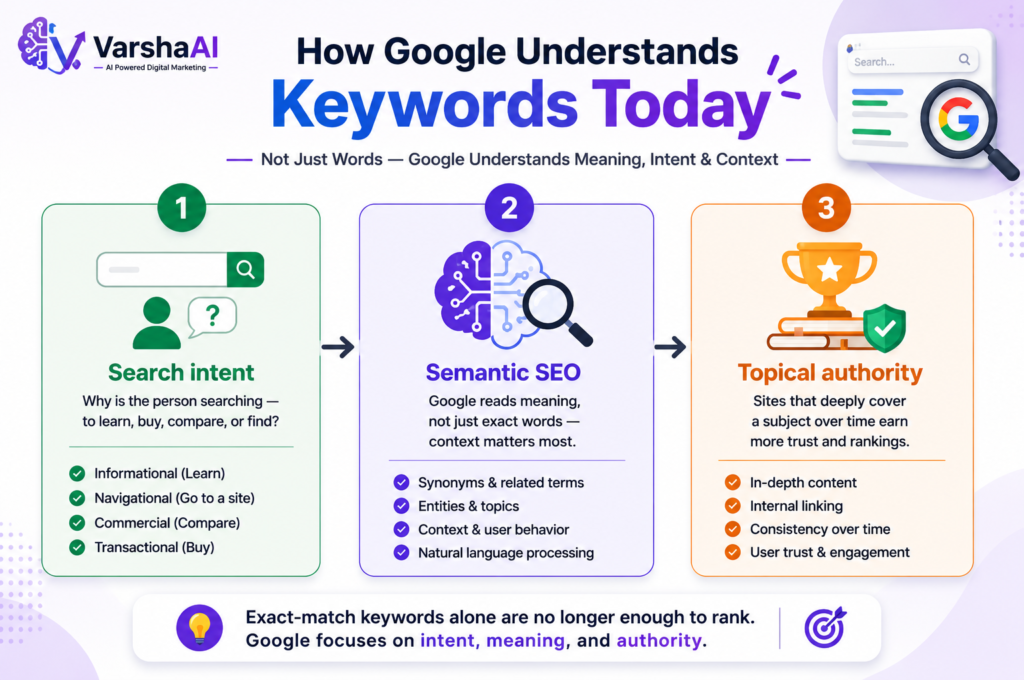
Search Intent Google no longer just matches words — it tries to understand why someone is searching. Are they trying to learn something (informational), buy something (transactional), compare options (commercial), or find a specific website (navigational)? Your content needs to match that intent, not just the keyword text.
Semantic SEO Modern search engines understand meaning and context, not just exact-match phrases. This means an article that thoroughly covers a topic — including related subtopics, questions, and terminology — tends to rank for dozens of related keywords, not just the one you optimized for.
Topical Authority Google increasingly favors websites that demonstrate deep coverage of a subject over time. A single great article helps, but a cluster of related, well-linked articles on the same topic builds trust and authority in Google’s eyes.
Why exact-match keywords alone aren’t enough: Ranking today isn’t about stuffing “keyword research for beginners” fifteen times into your article. It’s about genuinely answering the question better and more completely than anyone else, while naturally including the language your audience uses.
Types of Keywords
Not all keywords serve the same purpose. Understanding these categories helps you plan content strategically instead of randomly.
| Type | Example | Best For |
|---|---|---|
| Short-tail | “SEO” | High competition, brand awareness, hard to rank for as a beginner |
| Long-tail | “keyword research for beginners 2026” | Easier to rank, more specific, converts better |
| Informational | “what is keyword research” | Blog posts, guides, tutorials |
| Transactional | “buy SEO tool subscription” | Product pages, sales pages |
| Navigational | “Google Keyword Planner login” | Users looking for a specific site/tool |
| Commercial | “best free keyword research tools” | Comparison posts, reviews, affiliate content |
As a beginner, long-tail keywords are usually your best friend. They have lower competition, clearer intent, and are far more achievable to rank for while you’re still building your site’s authority.
How to Do Keyword Research Step by Step
Here’s a practical workflow you can follow for every article you write:
- Choose a topic — start broad. Example: “SEO for beginners”
- Understand your audience — what do they already know? What are they struggling with?
- Use Google’s autocomplete suggestions — type your topic into Google and see what it suggests
- Check “People Also Ask” — these are real questions people search for
- Look at Google Trends — is interest in this topic rising, stable, or fading?
- Study search intent — what type of content is currently ranking for this keyword?
- Do light competitor analysis — what are top-ranking articles covering (and missing)?
- Choose your focus keyword — the single main keyword your article targets
- List secondary keywords — related terms to naturally include throughout
- Build a content outline — organize headings around the keyword’s intent
This process takes 20–30 minutes once you get comfortable with it, and it will save you hours of writing content that goes nowhere.
Best Free AI Tools for Keyword Research
You don’t need paid software to start. Here are the tools I’d actually recommend to a beginner, along with honest pros and cons.
- Best for: Brainstorming keyword ideas, understanding search intent, generating content outlines
- Pros: Fast, conversational, great at explaining “why” behind a keyword’s intent
- Cons: Doesn’t have real-time search volume data; ideas need to be verified with actual search tools
- Free plan: Yes, with usage limits
Google Trends
- Best for: Checking whether interest in a topic is rising or declining, comparing keyword popularity over time
- Pros: Completely free, real Google data, great for seasonal/trending topics
- Cons: No exact search volume numbers, only relative interest
- Free plan: Fully free
Google Keyword Planner
- Best for: Getting actual search volume ranges and keyword suggestions
- Pros: Direct from Google, good for volume estimates
- Cons: Requires a Google Ads account, volume shown in broad ranges unless you’re running active ad campaigns
- Free plan: Free with a Google Ads account
Google Search (Autocomplete + People Also Ask)
- Best for: Real-time, real-user search behavior
- Pros: Completely free, shows exactly what people are typing right now
- Cons: Manual process, no volume data
- Free plan: Fully free
AnswerThePublic
- Best for: Visualizing question-based keywords around a topic
- Pros: Great for finding blog topic ideas and FAQ sections
- Cons: Free plan has limited daily searches
- Free plan: Limited free searches per day
Perplexity
- Best for: Researching a topic with cited sources while brainstorming related keywords
- Pros: Combines AI reasoning with real search results and citations
- Cons: Not a dedicated keyword tool — more of a research assistant
- Free plan: Yes
Google Search Console
- Best for: Finding keywords your existing site already ranks for (even at low positions)
- Pros: Shows real impressions and clicks for your own site — incredibly valuable once your site has some content live
- Cons: Only useful after you have a live, indexed website with some traffic history
- Free plan: Fully free
Don’t rely on just one tool. A realistic beginner workflow is: brainstorm with ChatGPT → validate interest with Google Trends → confirm real search behavior with Google Search and People Also Ask.
How to Choose the Right Focus Keyword
Once you have a list of possible keywords, you need to pick just one as your primary focus. Weigh these factors:
- Search volume — is there enough demand to make this worth writing about?
- Keyword difficulty — how competitive is it? As a beginner, avoid keywords dominated by huge, established websites.
- Intent match — does your planned content actually match what searchers want?
- Relevance — does this keyword genuinely fit your niche and audience?
- Business goals — will ranking for this keyword actually help your blog’s purpose (traffic, leads, sales)?
A keyword that scores well on all five is worth prioritizing. A keyword that’s high-volume but mismatched on intent or relevance is usually a trap.
How to Find Low-Competition Keywords
If your website is new, trying to rank for highly competitive keywords can be frustrating. Big websites with years of authority often dominate those search results, making it difficult for beginners to compete.
A better strategy is to focus on low-competition, long-tail keywords. These keywords usually have a more specific search intent, lower competition, and a better chance of helping your content rank on Google. While they may have fewer monthly searches, they often attract visitors who are looking for exactly what you offer.
Here are a few simple ways to discover low-competition keywords:
1. Focus on Long-Tail Keywords
Instead of targeting broad keywords like “SEO“ or “Digital Marketing,” choose more specific phrases such as:
- SEO for Beginners
- Keyword Research for Beginners
- How to Learn SEO from Scratch
- Free AI Tools for Keyword Research
Long-tail keywords are generally easier to rank for because they target a specific audience with a clear search intent.
2. Use Google Autocomplete
Start typing your topic into Google’s search bar and pay attention to the suggestions that appear automatically.
For example, typing “keyword research” may show suggestions like:
- keyword research for beginners
- keyword research tools
- keyword research examples
- keyword research checklist
These suggestions come directly from real user searches, making them an excellent source of content ideas.
3. Check the “People Also Ask” Section
Google’s People Also Ask box is one of the easiest ways to understand what your audience wants to know.
If you’re writing about keyword research, you might see questions like:
- What is keyword research?
- How do beginners find keywords?
- Which keyword research tool is free?
Answering these questions within your article can improve its usefulness and increase the chances of appearing in featured snippets.
4. Look at Forums and Online Communities
Platforms like Reddit, Quora, and niche communities are full of real questions from real people.
When you notice the same question being asked repeatedly, it often indicates genuine search demand. These discussions can help you discover content ideas that many keyword tools may overlook.
5. Study Smaller Websites
Many beginners only analyze large websites like HubSpot or Ahrefs. While they are excellent learning resources, their authority makes it difficult to compete directly.
Instead, look for smaller blogs that are already ranking on the first page of Google. If they can rank for a keyword, there’s a good chance your website can compete with high-quality, well-optimized content too.
6. Prioritize Search Intent Over Search Volume
One common mistake is choosing a keyword simply because it has a high search volume.
In many cases, a keyword with 300 monthly searches and low competition is far more valuable than one with 10,000 searches and intense competition.
When your content matches exactly what users are looking for, you have a much better chance of earning clicks, engagement, and long-term organic traffic.
Common Keyword Research Mistakes
- Choosing only high-volume keywords — these are often the most competitive and hardest for a new site to rank for
- Ignoring search intent — writing a blog post for a keyword where Google is showing product pages or videos
- Targeting too many keywords in one article — this dilutes focus and confuses both readers and Google
- Copying competitors blindly — just because a competitor ranks for a keyword doesn’t mean it’s right for your site’s authority level
- No internal linking — failing to connect related articles on your own site weakens topical authority and keeps visitors from exploring more of your content
My Biggest Observation
One thing I’ve consistently noticed is that beginners often spend too much time searching for the “perfect” keyword instead of creating genuinely helpful content. While choosing the right keyword is important, publishing valuable articles consistently matters even more.
In most cases, several well-written articles targeting realistic, low-competition keywords perform better than a single article targeting a highly competitive keyword. As your website grows and gains authority, you can gradually target broader and more competitive search terms.
If you’re just starting your blogging journey, don’t aim for perfection. Focus on understanding your audience, answering their questions clearly, and publishing consistently. Over time, this approach usually delivers better long-term SEO results than chasing only high-volume keywords.
Keyword Research Workflow
A simple visual summary of the process:
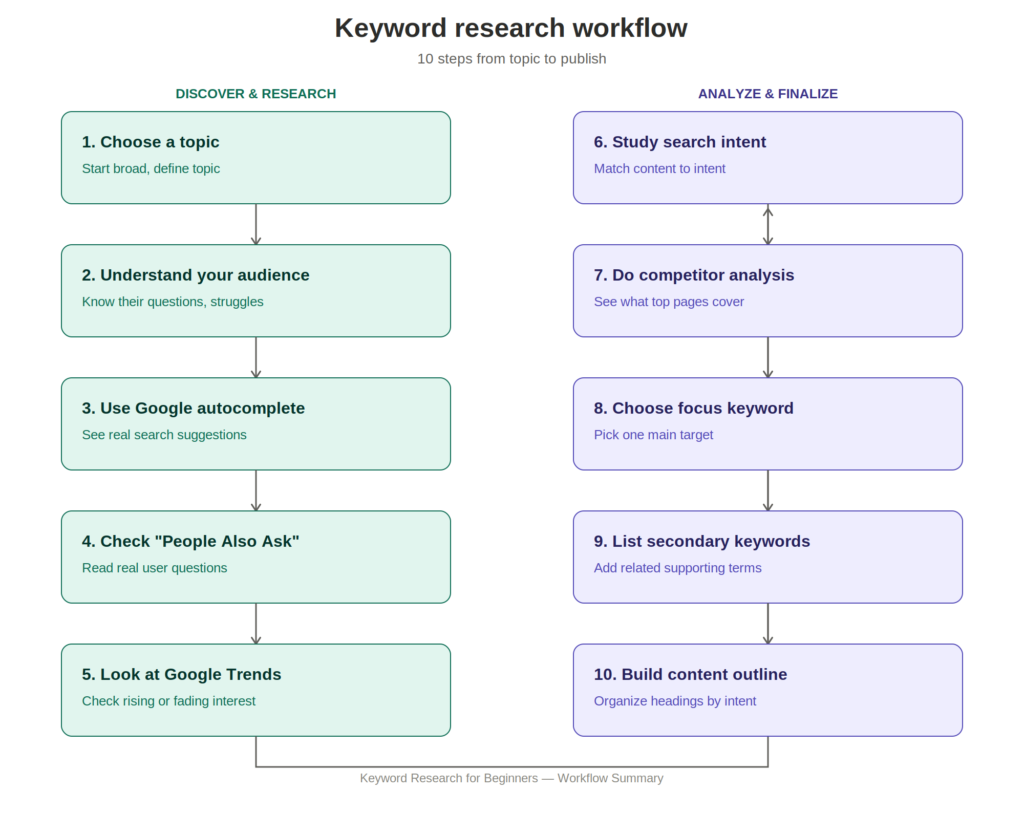
Keep this workflow next to you every time you plan a new article. Over time, it becomes second nature.
Quick Checklist Before Publishing
Before publishing any article, quickly review this Keyword Research for Beginners checklist to make sure your content is fully optimized.
- Focus keyword identified and confirmed with real search data
- Search intent matches your content format
- Focus keyword appears in H1, first 100 words, and conclusion
- At least 3 secondary keywords naturally included
- Content answers the question more completely than competitors
- Internal links added to related articles on your site
- Meta title and meta description written with focus keyword
- Content is genuinely useful — not just optimized
Conclusion
Keyword research for beginners doesn’t need to be complicated or expensive. Start with free tools like ChatGPT, Google Trends, and Google Search itself. Focus on understanding search intent rather than chasing high volume. Pick realistic, long-tail keywords you can actually compete for, and always prioritize genuinely helpful content over technical perfection.
Master this one skill, and every article you write from now on has a real shot at finding an audience — instead of disappearing into the void.
Continue Learning
- SEO for Beginners
- How to Use AI for SEO
- How to Write SEO-Friendly Blog Posts That Rank on Google
- How to Use ChatGPT for Digital Marketing in 2026
- AI for Content Creation in 2026
- Best AI Tools for Digital Marketing in 2026
- How to Start a Blog and Get Your First 1,000 Visitors
FAQs
What is keyword research? Keyword research is the process of finding and analyzing the words and phrases people search for, so you can create content that matches real demand.
How do beginners find keywords? Beginners can start with free tools like Google autocomplete, People Also Ask, Google Trends, and ChatGPT for brainstorming ideas.
What are long-tail keywords? Long-tail keywords are longer, more specific search phrases (usually 3+ words) that have lower competition and clearer search intent than broad, short-tail keywords.
Is ChatGPT good for keyword research? ChatGPT is great for brainstorming keyword ideas and understanding search intent, but it should be paired with real search-data tools like Google Trends for validation.
How many keywords should one article target? Focus on one primary keyword, supported by 3–5 naturally related secondary keywords. Avoid targeting too many unrelated keywords in a single article.
Can I do keyword research for free? Yes. Tools like Google Trends, Google Search, People Also Ask, and ChatGPT’s free plans are sufficient for most beginners.
What is search intent? Search intent is the underlying reason behind a search query — whether the person wants information, wants to buy something, wants to compare options, or is looking for a specific website.
Which free AI tool is best for keyword research? There isn’t one “best” tool — ChatGPT is strong for brainstorming, Google Trends for validating interest, and Google Search Console for finding keywords your own site already ranks for.
How long should keyword research take? For most blog posts, 20–30 minutes of focused keyword research is enough once you’re familiar with the process.
Should every blog post have one focus keyword? Yes. A single, clear focus keyword keeps your content targeted and makes it easier for both readers and search engines to understand what the page is about.